

Website Builder vs WordPress: Which Is Better for Your Website?
When you're ready to create a website, one of the first decisions you'll need to make is how you want to build it.
Should you use a website builder such as Webnode, Wix, Squarespace, or another all-in-one platform?
Or should you use WordPress, one of the world's most widely used content management systems?
Both options can be used to create professional websites. The main difference is how much control, flexibility, and technical responsibility you want to have.
For some people, a website builder is the easiest way to get online. For others, WordPress provides the flexibility they need to build a more complex website.
So which option is right for you?
Let's compare them.
What Is a Website Builder?
A website builder is a platform that allows you to create a website without having to build the underlying technology yourself.
Most website builders provide:
- Templates
- Visual editing tools
- Hosting
- Domain options
- Responsive designs
- Built-in features
- Security and maintenance
Many use a drag-and-drop or visual editing interface.
Instead of working with code, you can typically select an element, place it on the page, edit the text or images, and see the result immediately.
This makes website builders particularly attractive to beginners and people who want to create a website quickly.
If you're new to website creation, you can learn more in What Is a Website Builder?
What Is WordPress?
WordPress is an open-source content management system (CMS).
The software can be installed on a hosting server and used to create websites, blogs, online stores, portfolios, and many other types of websites. WordPress is highly extensible, with themes and plugins allowing users to change the appearance and functionality of their sites.
WordPress gives you considerably more control over the technical side of your website than many all-in-one website builders.
However, that flexibility can also mean more decisions and more responsibility.
It's important to distinguish between WordPress.org and WordPress.com. WordPress.org refers to the open-source WordPress software, while WordPress.com is a hosted service built around WordPress.
This article primarily compares website builders with the self-hosted WordPress approach.
Website Builder vs WordPress at a Glance
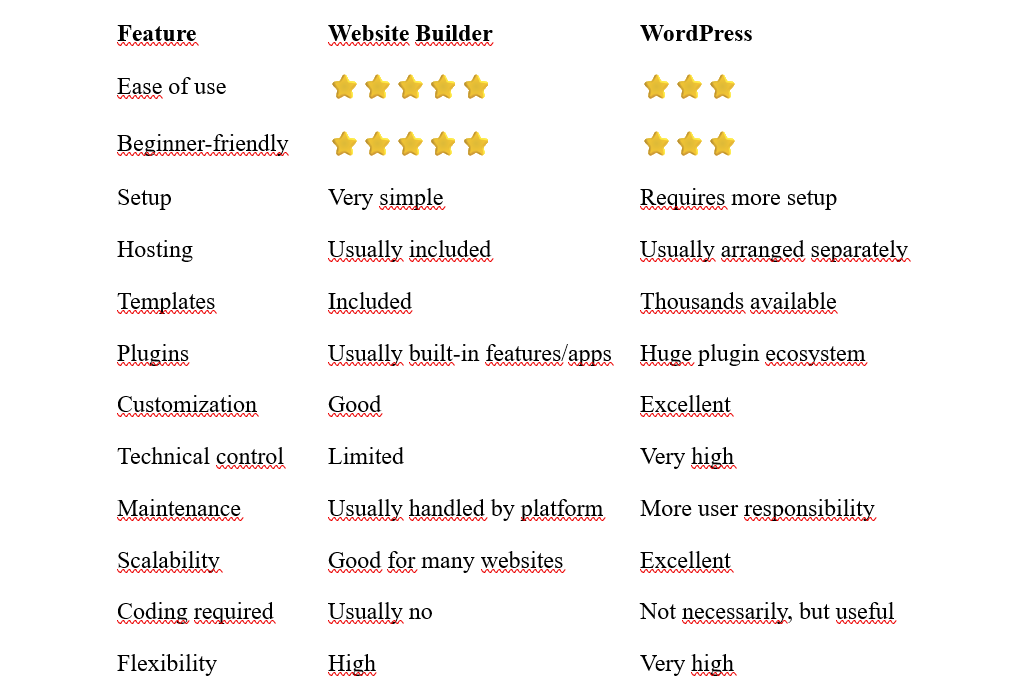
The exact experience varies considerably between individual website builders and WordPress setups, so these ratings should be viewed as a general comparison rather than a technical benchmark.
1. Ease of Use
This is probably the biggest difference between the two options.
Website Builders
Website builders are generally designed to make website creation as straightforward as possible.
You can usually:
- Choose a template.
- Add your content.
- Customize the design.
- Add pages.
- Connect your domain.
- Publish the website.
The visual interface means you don't need to understand how servers, databases, themes, or plugins work.
WordPress
WordPress has become much easier to use over the years, particularly with its block-based editing and Site Editor.
However, a self-hosted WordPress website still involves more decisions.
You may need to choose:
- Hosting
- A theme
- Plugins
- Backup solutions
- Security settings
- Performance tools
- Other services
WordPress itself provides extensive documentation and resources for getting started, but there is still a larger learning curve than with many all-in-one builders.
Winner for simplicity: Website builders
2. Getting Started
A website builder usually gives you most of the infrastructure you need in one place.
You create an account, select a design, start editing, and eventually connect your domain.
With self-hosted WordPress, you typically need hosting before you can install the software.
This isn't necessarily difficult, but there are more steps involved.
For someone who enjoys experimenting with technology, that's not necessarily a disadvantage.
For someone who simply wants a website, it can be unnecessary complexity.
Winner for quick setup: Website builders
3. Design and Templates
Both options provide a large selection of designs.
Website builders typically offer professionally designed templates that are integrated directly into the platform.
You can select a template and customize:
- Colors
- Fonts
- Images
- Layouts
- Sections
- Buttons
- Navigation
WordPress offers an enormous ecosystem of themes and design tools. Its current Site Editor and block system also provide considerable visual flexibility.
However, the quality and usability of WordPress themes can vary considerably because they come from many different developers.
With a website builder, the design system is generally more controlled by the platform.
Winner: Tie
4. Customization
This is where WordPress has a major advantage.
WordPress is open source and can be extended with thousands of plugins and themes.
You can add functionality for:
- Ecommerce
- Memberships
- Forums
- Booking systems
- Courses
- Newsletters
- Analytics
- Forms
- Directories
- Almost any other functionality you can find a suitable solution for
The official WordPress project describes its ecosystem as allowing users to extend their sites with stores, analytics, newsletters, social integrations, and other functionality through plugins.
Website builders also offer integrations and apps, but you're generally limited to what the platform supports.
Winner for maximum flexibility: WordPress
5. Hosting
With an all-in-one website builder, hosting is generally part of the service.
You don't need to find a separate hosting provider or configure a server yourself.
With self-hosted WordPress, hosting is a separate part of the setup.
This gives you more control over the hosting environment, but it also means another decision to make.
For beginners, having hosting handled automatically can be a significant advantage.
Winner for simplicity: Website builders
6. Maintenance
A website isn't finished when you publish it.
It needs to be maintained.
With a website builder, much of the technical maintenance is handled by the platform.
You generally don't need to worry about updating the underlying software yourself.
With WordPress, you may need to keep:
- WordPress core
- Themes
- Plugins
up to date.
You should also think about backups, security, compatibility, and performance.
WordPress gives you more control, but that control comes with additional responsibility.
Winner for lower maintenance: Website builders
7. Plugins and Extensions
WordPress is particularly strong when it comes to extensions.
Its plugin ecosystem allows you to add functionality without building everything yourself.
For example, you can install plugins for:
- SEO
- Ecommerce
- Forms
- Security
- Caching
- Analytics
- Memberships
- Booking
- Social media
This flexibility is one of the reasons WordPress can support everything from a simple blog to a complex business website.
Website builders typically provide their own apps and integrations.
These can be easier to use because they are designed specifically for the platform, but there may be fewer choices.
Winner for extensibility: WordPress
8. SEO
Both website builders and WordPress can be used to create search-engine-friendly websites.
The platform itself is only one part of SEO.
Other factors include:
- Content quality
- Website structure
- Page titles
- Internal linking
- Mobile usability
- Performance
- Backlinks
- Search intent
WordPress offers a large selection of SEO plugins and tools.
Website builders increasingly provide many SEO features directly within their platforms.
For most beginners, the more important question isn't whether a platform is theoretically capable of good SEO.
It's whether you can use it effectively.
A simple website that is properly structured and regularly maintained can be more valuable than a technically flexible platform that the owner doesn't know how to use.
For more information, see How to Improve Website SEO.
9. Mobile-Friendly Websites
Both WordPress and modern website builders can create responsive websites.
Responsive design allows a website to adapt its layout to different screen sizes.
This is important because Google uses the mobile version of a website for indexing and ranking through mobile-first indexing.
Website builders often make this particularly easy because responsive behavior is built into their templates and editing systems.
With WordPress, the mobile experience depends more heavily on the theme and other components you use.
Regardless of the platform, you should always test your website on an actual smartphone.
You can learn more in How to Make a Website Mobile-Friendly.
10. Cost
The cost comparison is more complicated than simply asking which option is cheaper.
Website Builders
Depending on the platform, you may pay for:
- Monthly or annual subscription
- Premium features
- Domain
- Ecommerce functionality
- Additional services
The advantage is that many costs are combined into one service.
WordPress
The WordPress software itself is open source.
However, a self-hosted WordPress website may require:
- Hosting
- Domain
- Premium theme
- Premium plugins
- Security tools
- Backup services
- Developer assistance
You can create a relatively inexpensive WordPress website, but costs can also grow as you add functionality.
If you're planning your first website, see How Much Does It Cost to Build a Website?
11. Scalability
Both options can support growing websites.
A website builder may be perfectly adequate for:
- Personal websites
- Small businesses
- Portfolios
- Freelancers
- Restaurants
- Service businesses
- Simple online stores
WordPress is particularly attractive when a website needs to become highly customized or technically complex.
Because WordPress can be extended with themes, plugins, and custom development, it can evolve significantly as a project grows.
However, you shouldn't choose the most complicated solution simply because you might need it someday.
Choose the platform that fits your current requirements and has enough room for your expected growth.
12. Who Should Choose a Website Builder?
A website builder is often a good choice if you:
- Are creating your first website
- Don't want to learn technical details
- Want to launch quickly
- Prefer visual editing
- Want hosting included
- Don't want to manage plugins and updates
- Need a relatively straightforward website
- Prefer predictable costs
For many individuals and small businesses, this can be more than enough.
If this sounds like you, start with Best Website Builders for Beginners.
13. Who Should Choose WordPress?
WordPress may be a better choice if you:
- Want maximum control
- Need extensive customization
- Plan to build a complex website
- Need specialized functionality
- Want access to a huge plugin ecosystem
- Are comfortable managing a more technical platform
- Expect to work with developers
WordPress is also a natural choice for people who enjoy experimenting and want greater control over how their website works.
It can be used for everything from personal blogs and portfolios to business websites, online stores, and much more.
Website Builder vs WordPress: Which Is Better for Beginners?
For most complete beginners, a website builder is usually the easier starting point.
You can focus on:
content → design → visitors
rather than:
hosting → themes → plugins → updates → security → content → design
That doesn't mean WordPress is unsuitable for beginners.
WordPress can certainly be learned, and its current editing tools are much more approachable than they once were.
But if your main goal is simply to get a professional website online with minimal technical work, a website builder can be the more convenient option.
Website Builder vs WordPress for Small Businesses
Small businesses have different requirements.
A local restaurant might only need:
- Menu
- Opening hours
- Location
- Contact information
- Reservation option
A consultant might need:
- Services
- About page
- Testimonials
- Contact form
- Blog
A growing online business might need significantly more functionality.
For relatively straightforward websites, a website builder can be an efficient solution.
If you need highly specialized functionality, WordPress may provide more flexibility.
You can also explore our guides to Best Website Builders for Small Business, Best Website Builders for Local Businesses, and Best Website Builders for Consultants.
Website Builder vs WordPress for Bloggers
Both platforms can be used for blogging.
WordPress has a long history as a publishing platform and remains a powerful option for bloggers who want extensive control over their content and website.
A website builder can be a better choice if you want a simpler publishing experience and don't need extensive customization.
If blogging is your primary goal, consider how much control and flexibility you actually need before choosing a platform.
You can also see Best Website Builders for Bloggers.
Website Builder vs WordPress for Online Stores
Both can be used for ecommerce.
Website builders can make it relatively easy to create a store with integrated product management, payments, and other essential features.
WordPress can be extended with ecommerce plugins and offers considerable flexibility for more specialized stores.
The right choice depends on the size and complexity of your store.
For a relatively straightforward store, simplicity may be more important than unlimited customization.
For a complex ecommerce operation, the flexibility of WordPress may become more valuable.
See Best Website Builders for Online Stores for more options.
Is WordPress Better Than a Website Builder?
There isn't a universal winner.
WordPress is more flexible and customizable.
Website builders are generally easier to set up and maintain.
So the better question isn't:
"Which platform is better?"
It's:
"Which platform is better for me?"
If you want simplicity, a website builder may be the better choice.
If you want maximum control and flexibility, WordPress may be the better choice.
Can You Switch From a Website Builder to WordPress Later?
Sometimes, yes.
However, moving a website from one platform to another isn't always completely straightforward.
You may need to recreate:
- Pages
- Design
- Navigation
- Forms
- Integrations
- Content
You may also need to handle redirects and other SEO considerations.
For this reason, it's worth thinking about your long-term requirements before choosing a platform.
But don't let the possibility of a future migration stop you from launching your website today.
For a simple website, getting online with an appropriate platform can be much more valuable than spending months trying to find the theoretically perfect solution.
Website Builder vs WordPress: Pros and Cons
Website Builder Pros
- Easy to use
- Fast setup
- Visual editing
- Hosting usually included
- Less technical maintenance
- Beginner-friendly
- Professional templates
Website Builder Cons
- Less technical control
- Some advanced features may not be available
- Platform-specific limitations
- Monthly subscription may be required
- Less flexibility than WordPress for highly customized projects
WordPress Pros
- Extremely flexible
- Open source
- Huge ecosystem of themes and plugins
- Extensive customization
- Suitable for simple and complex websites
- Large global community
WordPress Cons
- More setup
- More technical decisions
- Updates and maintenance
- Hosting needs to be managed separately with self-hosted WordPress
- Poorly chosen themes or plugins can complicate a website
Website Builder or WordPress: Which Should You Choose?
Here's a simple way to think about it.
Choose a website builder if:
"I want to create a professional website without dealing with technical complexity."
Choose WordPress if:
"I want maximum flexibility and I'm willing to take more responsibility for managing the website."
Neither approach is inherently right or wrong.
The best platform is the one that matches your skills, budget, goals, and willingness to manage the technical side of your website.
Final Thoughts
Website builders and WordPress have both become powerful tools for creating websites.
A website builder focuses on simplicity and convenience.
WordPress focuses on flexibility and control.
For a beginner who wants to create a website quickly, a website builder can be an excellent choice. For someone who needs extensive customization or plans to build a technically complex project, WordPress may be the better option.
Don't choose a platform simply because it is more powerful.
Choose the platform that makes it easiest for you to create and maintain the website you actually need.
If you're leaning toward a website builder, take a look at Best Website Builders 2026 and compare the options before getting started.
⭐ Popular Guides ⭐
Ready to choose the right platform? Explore these guides to find the best way to create your website.


