

Best Website Builders for Online Stores 2026
Starting an online store is easier than ever. You don't necessarily need to hire a developer or learn how to code to start selling products online.
Modern website builders and ecommerce platforms allow you to create a storefront, add products, accept payments, manage orders, and build a professional online presence from one place.
The challenge is choosing the right platform. A small store selling a few products has very different needs from a growing ecommerce business with hundreds or thousands of products.
In this guide, we'll look at the best website builders for online stores in 2026 and what to consider before choosing one.
What Should You Look for in an Ecommerce Website Builder?
An online store needs more than an attractive homepage.
Before choosing a platform, consider whether it provides the features you'll actually need as your store grows.
Important features include:
- Product listings
- Shopping cart
- Secure checkout
- Payment processing
- Order management
- Inventory management
- Shipping options
- Discount codes
- Product categories
- Mobile-friendly design
- Custom domain support
- SEO tools
- Analytics
- Marketing integrations
- Ecommerce templates
It's also worth thinking about how easy it will be to manage the store every day.
Adding a new product, changing a price, updating inventory, or processing an order shouldn't require technical knowledge.
Best Website Builders for Online Stores in 2026
Here are some of the strongest options:
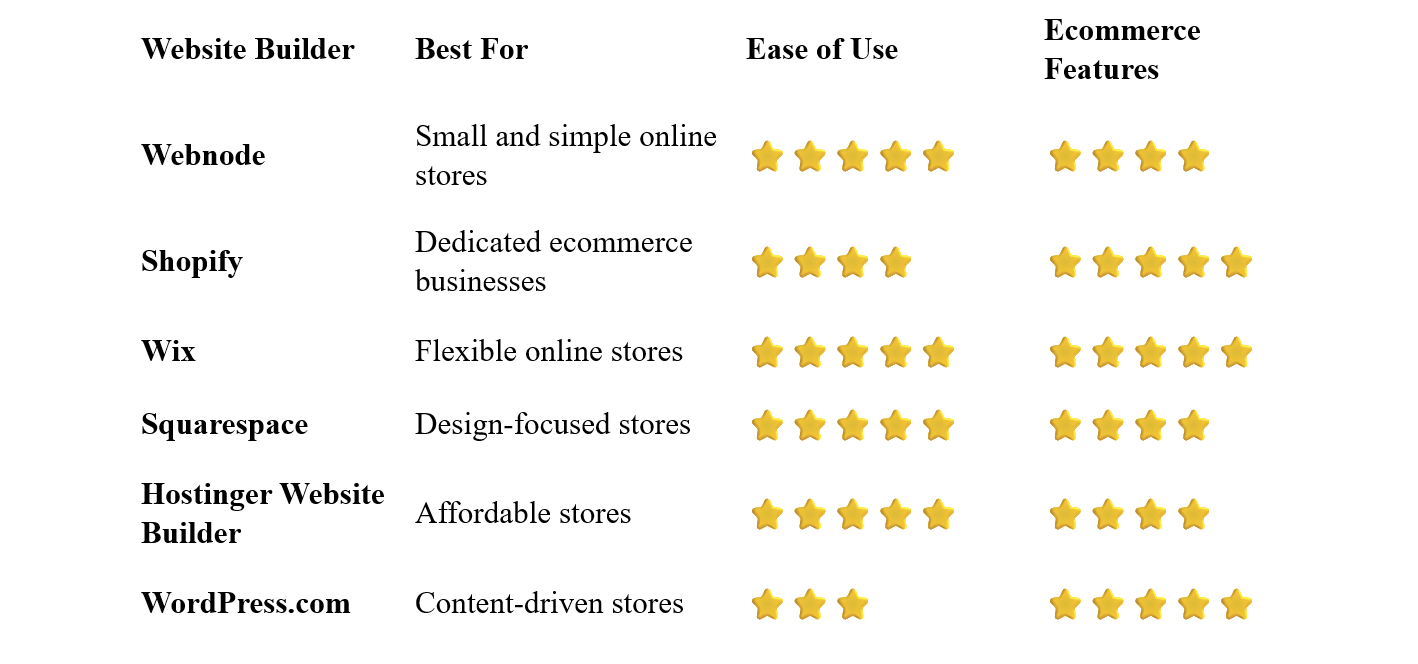
Webnode – Best for Simple Online Stores
Webnode is a good option for entrepreneurs who want to create a relatively simple online store without dealing with complicated technology.
Its visual editor makes it easy to build pages, add products, customize your design, and manage your website without coding.
You can create product pages, organize products into categories, add images and descriptions, and provide customers with a straightforward shopping experience.
Webnode also combines ecommerce functionality with regular website features such as blogging, forms, SEO tools, and AI-powered website creation.
Why choose Webnode?
- Easy visual editor
- No coding required
- Ecommerce functionality
- Product pages and categories
- Shopping cart and checkout
- Payment options
- SEO tools
- Custom domain options
- Blogging
- AI website creation tools
This makes Webnode particularly appealing if you want an online store that is simple to create and manage.
For example, a small business selling handmade products, clothing, artwork, or specialty food products may not need the complexity of a dedicated ecommerce platform.
Best for: Small online stores, beginners, freelancers, artists, and businesses selling a relatively limited range of products.
Shopify – Best for Dedicated Ecommerce
Shopify is one of the best-known ecommerce platforms and is built specifically around online selling.
It provides extensive tools for:
- Product management
- Inventory
- Payments
- Shipping
- Discounts
- Marketing
- Analytics
- Customer management
- Multiple sales channels
Shopify can support everything from a small online store to a large ecommerce operation.
Its extensive ecosystem also allows merchants to expand their stores with additional apps and integrations.
The trade-off is that Shopify can be more complex than a simple website builder, particularly if you only want to sell a small number of products.
Best for: Businesses where ecommerce is the primary focus.
Wix – Best for Flexible Online Stores
Wix combines an easy visual website editor with extensive ecommerce functionality.
You can create an online store while also building regular pages for your business, blog, portfolio, or services.
The platform offers product pages, shopping carts, payments, inventory management, marketing tools, and other ecommerce features.
Wix can therefore be a good middle ground between a simple website builder and a dedicated ecommerce platform.
Best for: Small and medium-sized businesses that want both a flexible website and an online store.
Squarespace – Best for Design-Focused Stores
Squarespace is particularly attractive for businesses that want their online store to have a polished visual identity.
Its templates put considerable emphasis on photography, typography, layouts, and branding.
This can work especially well for stores selling visually appealing products such as:
- Fashion
- Jewelry
- Art
- Home décor
- Handmade products
- Beauty products
Squarespace also provides ecommerce tools for managing products, payments, orders, and other aspects of an online store.
Best for: Businesses that prioritize design and brand presentation.
Hostinger Website Builder – Best Affordable Option
Hostinger combines website building, hosting, templates, AI-powered tools, and ecommerce functionality.
Its beginner-friendly approach can make it a practical choice for entrepreneurs who want to launch a relatively small store without a large initial investment.
You can create product pages, customize your store design, and manage your website through a visual editor.
Best for: Beginners and small businesses looking for an affordable way to start selling online.
WordPress.com – Best for Content-Driven Ecommerce
WordPress.com can be a powerful option when content marketing is an important part of your ecommerce strategy.
For example, a coffee store could publish articles about brewing methods, coffee beans, and equipment while selling products through the website.
This combination of content and ecommerce can create additional opportunities to attract visitors from search engines.
WordPress offers extensive flexibility, but it generally requires more learning and management than simpler website builders.
Best for: Businesses that want to combine ecommerce with blogging and content marketing.
What Type of Online Store Are You Building?
Before choosing a platform, think about what you're selling.
Physical Products
Examples include:
- Clothing
- Electronics
- Furniture
- Handmade products
- Cosmetics
- Food
You'll need to consider inventory, shipping, returns, and payment processing.
Digital Products
You might sell:
- Ebooks
- Courses
- Templates
- Software
- Music
- Digital artwork
- Photography
Digital products don't require physical shipping, which can simplify the ecommerce process.
Services
Some businesses use ecommerce functionality to sell services or packages.
Examples include:
- Consulting
- Coaching
- Design services
- Photography
- Online lessons
Your requirements may be quite different from those of a traditional product store.
Subscriptions
Subscription businesses can offer:
- Memberships
- Recurring product deliveries
- Premium content
- Software
- Digital services
If recurring payments are central to your business model, check that your chosen platform supports the specific subscription functionality you need.
How Many Products Will You Sell?
The size of your catalog should influence your decision.
Small Catalog
If you're selling 5–20 products, you probably don't need a highly complex ecommerce platform.
A simple website builder may be enough.
Medium Catalog
A store with dozens or hundreds of products may benefit from better inventory management, product organization, filtering, and marketing tools.
Large Catalog
If you plan to sell thousands of products or operate ecommerce as your primary business, a dedicated ecommerce platform such as Shopify may be worth considering.
What Payment Options Do Online Stores Need?
The right payment options depend on your customers and location.
Common options include:
- Credit and debit cards
- Digital wallets
- Bank transfers
- Local payment methods
- Buy-now-pay-later services
Before choosing a platform, make sure it supports the payment methods your customers are likely to use.
Also check transaction fees and payment-processing costs.
Shipping and Delivery
If you sell physical products, shipping can have a major impact on your business.
Your website may need to support:
- Shipping zones
- Multiple delivery methods
- Shipping rates
- Free shipping thresholds
- Local pickup
- International shipping
Keep the checkout process as simple as possible.
Unexpected shipping costs appearing at the end of checkout can cause customers to abandon their purchases.
Search engines can be an important source of traffic for online stores.
Start with the basics:
- Create descriptive product titles
- Write useful product descriptions
- Optimize product images
- Use descriptive URLs
- Create logical product categories
- Add internal links
- Optimize page titles and descriptions
- Make the website mobile-friendly
- Improve page speed
Create Useful Product Descriptions
Don't simply copy manufacturer descriptions if you can avoid it.
Write original descriptions that explain:
- What the product does
- Who it's for
- Important features
- Materials or specifications
- Benefits
- How it compares with alternatives
Useful descriptions can help both customers and search engines understand your products.
Create Category Pages
Organize products logically.
For example, a clothing store might have:
Women's Clothing
Men's Clothing
Shoes
Accessories
Well-structured categories make it easier for visitors to browse your store.
How to Build an Online Store
1. Choose What to Sell
Define your products and target customers before building the store.
2. Choose a Business Name and Domain
Pick a name that's easy to remember and works well as a brand.
Select a platform based on your catalog size, ecommerce requirements, budget, and technical skills.
Start with a clean ecommerce design that puts your products at the center.
5. Add Your Products
For each product, include:
- Product name
- Description
- Price
- Photographs
- Available options
- Stock information
6. Configure Payments
Set up the payment methods your customers will use.
7. Configure Shipping
Define shipping methods, costs, and delivery areas.
8. Add Store Policies
Clearly explain:
- Returns
- Refunds
- Shipping
- Privacy
- Terms and conditions
9. Connect Your Domain
A custom domain makes your store look more professional and easier to remember.
10. Test the Checkout
Before launching, place a test order and check the entire purchasing process.
Make sure customers can:
- Find a product
- Add it to the cart
- Enter their details
- Select delivery
- Pay
- Receive confirmation
11. Launch and Promote Your Store
Once everything works correctly, launch the website and start promoting your products.
Common Online Store Mistakes
Too Many Products at Launch
You don't necessarily need hundreds of products to start.
A smaller, focused catalog can be easier to manage.
Poor Product Photography
Customers can't physically examine products through your website.
Good photographs are therefore extremely important.
Weak Product Descriptions
Give customers enough information to make an informed purchasing decision.
Complicated Checkout
The more unnecessary steps customers have to complete, the greater the chance they abandon their cart.
Hidden Shipping Costs
Be transparent about shipping costs before the final stage of checkout.
Ignoring Mobile Customers
Many ecommerce purchases happen on smartphones.
Your store should be easy to browse and use on smaller screens.
Forgetting About SEO
A beautiful store won't automatically attract visitors.
Create useful content and optimize your product and category pages for search engines.
Which Website Builder Is Best for Online Stores?
The best platform depends on the size and purpose of your store.
Webnode is an appealing option for small stores that want an easy and intuitive way to create and manage an online shop without coding.
Shopify is one of the strongest choices when ecommerce is the primary focus of the business.
Wix offers a good combination of visual flexibility and ecommerce functionality.
Squarespace is particularly attractive for design-focused brands and visually oriented products.
Hostinger Website Builder is worth considering for beginners and small businesses looking for an affordable solution.
WordPress.com can be a strong choice when blogging and content marketing are important parts of your ecommerce strategy.
Final Thoughts
Choosing an ecommerce platform is an important decision, but you don't necessarily need the most powerful solution available.
If you're launching a small online store, a straightforward website builder may provide everything you need. As your business grows, you can consider more advanced ecommerce tools and features.
For entrepreneurs who value simplicity and easy website management, Webnode is a particularly interesting option. Its visual editor allows you to create a professional website and combine it with ecommerce functionality without requiring coding skills.
If ecommerce is going to be the central focus of a larger business, Shopify may be a better fit. Wix and Squarespace offer useful alternatives for businesses that want to combine ecommerce with a broader branded website.
Start with a clear product range, professional images, simple navigation, transparent pricing and shipping, and an easy checkout experience. Your online store doesn't need to be complicated to provide a professional shopping experience.
⭐ Popular Guides ⭐
Looking for inspiration for your next website? Explore our popular guides for ideas and recommendations for different types of websites and online projects.


