

Best Website Builders for Artists 2026
For artists, a website can be much more than a place to display finished work. It can become your online portfolio, personal gallery, professional profile, and even an online store.
Whether you're a painter, illustrator, sculptor, digital artist, photographer, or mixed-media creator, your website gives you complete control over how your work is presented online.
You don't need to hire a web designer or learn how to code. Modern website builders make it possible to create attractive artist websites using templates, visual editors, galleries, blogs, and ecommerce tools.
The challenge is finding a platform that combines beautiful presentation, simplicity, portfolio features, and the ability to sell your work if needed.
In this guide, we'll look at the best website builders for artists in 2026.
What Should Artists Look for in a Website Builder?
An artist's website should put the artwork at the center.
A good platform should make it easy to:
- Create an online portfolio
- Display high-quality images
- Organize artwork into galleries
- Create individual project pages
- Add an artist biography
- Publish exhibitions and events
- Write a blog
- Sell artwork online
- Add contact information
- Connect social media
- Use a custom domain
- Optimize the website for search engines
- Create a mobile-friendly website
The ability to update your portfolio without technical knowledge is also important.
As you create new work, you should be able to add it to your website quickly and remove older pieces when your portfolio changes.
Best Website Builders for Artists in 2026
Here are some of the strongest options:
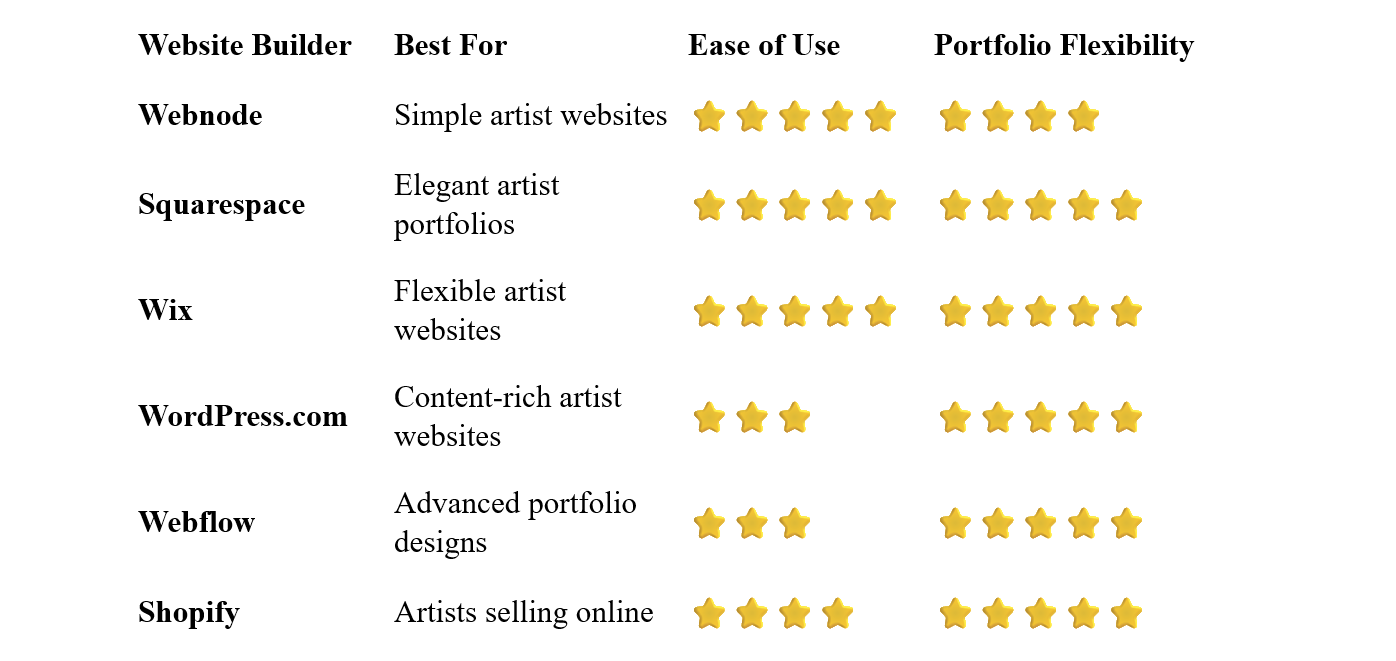
Webnode – Best for Simple Artist Websites
Webnode is a good choice for artists who want to create a professional online portfolio without dealing with complicated website technology.
Its visual editor makes it easy to create pages, add images, organize content, and update your website without coding.
You can start with a portfolio or creative template and customize it with your own artwork, biography, colors, typography, and branding.
Webnode also provides image galleries, contact forms, blogging, SEO tools, AI-powered website creation, and ecommerce functionality.
Why choose Webnode?
- Easy visual editor
- No coding required
- Portfolio-friendly templates
- Image galleries
- Contact forms
- SEO tools
- Custom domain options
- Blogging
- AI website creation tools
- Ecommerce functionality
For artists who want to focus on their work rather than website technology, this simplicity can be a major advantage.
You can add new artwork, create new gallery pages, publish an exhibition announcement, or update your biography yourself.
Best for: Painters, illustrators, sculptors, digital artists, independent artists, and creators who want a straightforward portfolio website.
Squarespace – Best for Elegant Artist Portfolios
Squarespace is particularly attractive for artists who want a visually polished website.
Its templates emphasize typography, spacing, imagery, and clean layouts, giving artwork plenty of room to stand out.
You can create portfolios, galleries, project pages, blogs, event information, and online stores.
This can make Squarespace a particularly good fit when the presentation of your website is an important part of your artistic identity.
Best for: Artists who prioritize visual design and elegant portfolio presentation.
Wix – Best for Flexible Artist Websites
Wix offers extensive design flexibility and a large selection of templates.
Artists can create portfolios, galleries, individual artwork pages, blogs, contact pages, and online stores.
The visual editor provides significant control over layouts, allowing you to create a website that reflects your personal style.
Wix also provides a broad range of additional business and marketing features.
Best for: Artists who want extensive customization and flexibility.
WordPress.com – Best for Content-Rich Artist Websites
WordPress.com can be a strong option if your website will contain more than just a portfolio.
You can publish:
- Artist statements
- Exhibition announcements
- Studio journals
- Tutorials
- Interviews
- Behind-the-scenes content
- Articles about your creative process
This can help you build an audience and demonstrate your expertise and personality.
WordPress offers considerable flexibility, although it generally requires more time to learn than simpler website builders.
Best for: Artists who want to combine their portfolio with blogging and extensive written content.
Webflow – Best for Advanced Artist Portfolios
Webflow offers advanced control over layouts, animations, interactions, and responsive design.
This makes it possible to create highly customized artist portfolios that can feel more like digital galleries than traditional websites.
The downside is the learning curve.
If your priority is simply getting your artwork online quickly, Webflow may be more complex than necessary.
Best for: Experienced users and artists who want highly customized portfolio designs.
Shopify – Best for Artists Selling Online
Shopify is primarily an ecommerce platform, making it particularly useful for artists who want to sell their work online.
You can use it to sell:
- Original artwork
- Prints
- Posters
- Digital art
- Books
- Merchandise
- Art supplies
- Other creative products
If you only want a portfolio without selling anything, Shopify may provide more ecommerce functionality than you need.
Best for: Artists whose website is also an online store.
What Should an Artist's Website Include?
You don't need dozens of pages to create a professional artist website.
A focused structure can work very well.
Homepage
Your homepage should immediately introduce your artistic identity.
Feature some of your strongest work and make it easy for visitors to explore your portfolio.
Portfolio
This is usually the heart of an artist's website.
Select work that represents your current style and the type of projects you want to attract.
Galleries
You can organize artwork into categories such as:
- Paintings
- Sculptures
- Illustrations
- Digital Art
- Photography
- Drawings
- Mixed Media
The exact categories should reflect your work.
About
Tell visitors who you are and give them some context about your artistic practice.
You might include:
- Short biography
- Artistic background
- Education
- Awards
- Exhibitions
- Publications
- Artistic influences
Artist Statement
An artist statement can explain your ideas, themes, techniques, or creative process.
It can be particularly useful for galleries, collectors, curators, and people who want to understand the thinking behind your work.
Exhibitions
If you participate in exhibitions, consider creating a page listing upcoming and previous events.
Contact
Make it easy for galleries, collectors, potential clients, and visitors to contact you.
Online Store
If you sell artwork directly, an online store can allow visitors to purchase pieces without leaving your website.
Should Artists Sell Their Work Through Their Website?
For many artists, yes.
Selling directly through your website can provide another way to reach collectors and customers.
Depending on what you create, you could sell:
- Original paintings
- Limited-edition prints
- Digital artwork
- Posters
- Books
- Merchandise
- Commissions
However, ecommerce isn't necessary for every artist.
If your primary goal is to attract gallery representation or commissions, a portfolio and professional contact information may be more important.
Should Artists Include Prices?
This depends on your business model.
Artists who sell prints or standardized products can usually benefit from clearly displaying prices.
For original artwork, commissions, or high-value pieces, some artists prefer to invite potential buyers to contact them.
There isn't one correct approach.
Think about what makes the purchasing process easiest for your particular audience.
Do Artists Need a Blog?
Not necessarily.
A blog can be useful if you enjoy writing and want to share more about your creative process.
Possible topics include:
- New artwork
- Studio updates
- Exhibition announcements
- Creative techniques
- Art tutorials
- Inspiration
- Materials and tools
- Stories behind individual pieces
A blog can also provide additional content that search engines can discover.
However, don't let blogging distract from your portfolio. Your artwork should remain the primary focus of the website.
SEO for Artist Websites
Search engines can help people discover your work, especially if you target specific artistic niches or services.
Start with basic SEO:
- Use descriptive page titles
- Create clear headings
- Write useful descriptions
- Optimize images
- Use descriptive image filenames
- Add relevant alt text
- Use descriptive URLs
- Link related pages together
- Make the website mobile-friendly
Create Specific Portfolio Pages
Instead of placing every piece of artwork on one enormous page, consider organizing your work into meaningful collections.
For example:
Abstract Paintings
Portrait Paintings
Digital Illustrations
Landscape Photography
This makes your portfolio easier to navigate and can also help search engines understand the content of each page.
Use Your Name and Artistic Specialty
If you're building a personal brand, make your name prominent throughout the website.
You can also clearly communicate what type of artist you are.
For example:
Anna Smith – Contemporary Painter
or
David Jones – Digital Illustrator
This can make your website easier to understand for both visitors and search engines.
Image Optimization for Artists
High-quality images are essential, but large image files can slow down your website.
This is particularly important for artists because portfolio websites can contain dozens or hundreds of photographs of artwork.
Before uploading images, consider:
- Resizing them appropriately
- Compressing large files
- Using modern image formats when available
- Avoiding unnecessarily large originals
The goal is to find a good balance between image quality and website performance.
How to Build an Artist Website
1. Define Your Purpose
Decide what you want the website to accomplish.
Do you want to:
- Showcase your portfolio?
- Sell artwork?
- Attract commissions?
- Promote exhibitions?
- Build your personal brand?
- Connect with galleries?
Your answer will influence the structure of the website.
2. Select Your Best Work
Don't upload everything.
Choose artwork that represents your current style and the type of work you want to be known for.
Select a platform based on your design preferences and business needs.
4. Choose a Portfolio Template
Start with a clean layout that puts your artwork first.
A good starting structure might include:
- Home
- Portfolio
- About
- Exhibitions
- Contact
Add a store, blog, artist statement, or other pages when appropriate.
6. Add Your Branding
Use your name, logo, typography, colors, and imagery consistently throughout the website.
A custom domain makes your website easier to remember and gives your online presence a more professional appearance.
Your portfolio should look good on smartphones and tablets as well as desktop computers.
9. Keep Your Portfolio Current
As your work develops, update the website.
Replace weaker or older pieces when necessary and add your strongest new work.
Common Artist Website Mistakes
Showing Everything
A portfolio isn't an archive.
Show your strongest work rather than every piece you've ever created.
Poor Image Quality
If your website is supposed to showcase your art, low-quality photographs can undermine the entire presentation.
Huge Image Files
High-quality images are important, but unnecessarily large files can make the website slow.
Too Much Text
Your biography and artist statement matter, but visitors should still be able to explore your work easily.
No Clear Contact Information
Make it obvious how galleries, collectors, clients, or visitors can contact you.
Ignoring Mobile Design
Your portfolio needs to work well on small screens.
Which Website Builder Is Best for Artists?
The best choice depends on what you want from your website.
Webnode is an excellent option if you want a simple and intuitive way to create and manage a professional artist website without coding.
Squarespace is particularly attractive for artists who want elegant visual presentation and a polished portfolio.
Wix offers extensive customization and a wide range of additional features.
WordPress.com is worth considering if you want to combine your portfolio with substantial blogging and content.
Webflow provides advanced design control for artists who want a highly customized digital portfolio.
Shopify makes the most sense for artists who want their website to function primarily as an online store.
Final Thoughts
An artist's website should ultimately be an extension of their creative identity.
Your portfolio should take center stage, while the rest of the website provides context about who you are, what you create, where your work has been exhibited, and how visitors can contact or buy from you.
A website builder makes it possible to create that online presence without hiring a developer or learning how to code.
For artists who value simplicity and easy website management, Webnode is a particularly appealing option. Its visual editor allows you to create galleries, showcase your artwork, add information about yourself, and update your portfolio without complicated technical work.
If sophisticated visual design is your highest priority, Squarespace or Wix may be worth considering. If you want advanced customization, Webflow provides considerably more control, while Shopify is a natural choice for artists who want to focus heavily on online sales.
Choose the platform that fits your creative and business goals, showcase your strongest work, and make it easy for visitors to discover, appreciate, and connect with your art.
⭐ Popular Guides ⭐
Looking for inspiration for your next website? Explore our popular guides for ideas and recommendations for different types of websites and online projects.


