

Best Website Builders for Restaurants 2026
For a restaurant, a website can be one of the most effective ways to attract new customers and give existing guests the information they need.
People often visit a restaurant website to check the menu, opening hours, location, photographs, reservations, and contact details. A good website should make finding this information quick and effortless.
You don't need to hire a developer or build a complicated custom website to achieve that. Modern website builders make it possible to create professional restaurant websites using templates, visual editors, menus, galleries, reservation tools, and other business features.
The challenge is choosing a platform that combines good design, ease of use, mobile-friendly pages, restaurant features, and reasonable costs.
In this guide, we'll look at the best website builders for restaurants in 2026.
What Should Restaurants Look for in a Website Builder?
A restaurant website has some specific requirements.
Unlike a typical business website, food and hospitality businesses rely heavily on photographs, menus, location information, and reservations.
Useful features include:
- Restaurant templates
- Online menus
- Food photography
- Image galleries
- Reservation forms
- Contact forms
- Maps and location information
- Opening hours
- Mobile-friendly design
- Custom domain support
- SEO tools
- Social media integration
- Online ordering
- Ecommerce functionality
It's also important that restaurant owners and staff can update the website easily.
If you change your menu, add a seasonal special, or adjust your opening hours, you should be able to make the change without contacting a developer.
Best Website Builders for Restaurants in 2026
Here are some of the strongest options:
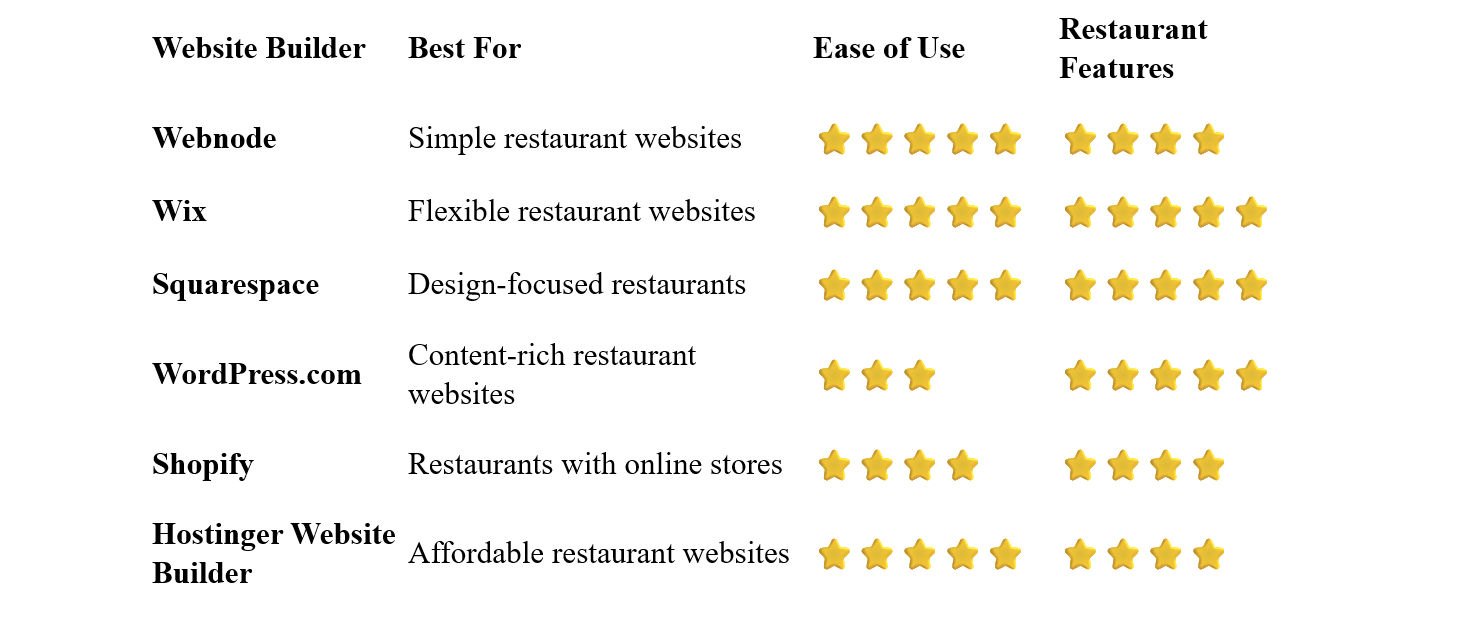
Webnode – Best for Simple Restaurant Websites
Webnode is a good choice for restaurant owners who want a professional website without complicated setup or coding.
Its visual editor allows you to create pages, add photographs, publish menus, and update information without needing technical knowledge.
You can start with a restaurant or business template and customize it with your own branding, food photography, menu, opening hours, location, and contact information.
Webnode also offers forms, SEO tools, blogging, AI-powered website creation, and ecommerce functionality.
Why choose Webnode?
- Easy visual editor
- No coding required
- Business and restaurant-friendly templates
- Image galleries
- Contact forms
- SEO tools
- Custom domain options
- Blogging
- AI website creation tools
- Ecommerce functionality
For a restaurant owner, the simplicity of managing the website can be especially useful.
You can update your menu, add photographs of new dishes, change opening hours, or publish a special offer yourself.
Best for: Restaurants, cafés, bakeries, bars, bistros, and other food businesses that want a straightforward website.
Wix – Best for Flexible Restaurant Websites
Wix provides a large selection of templates and extensive customization options for restaurants.
You can create menus, galleries, reservation pages, contact forms, blogs, and online stores.
Its visual editor allows you to customize the layout and branding without coding.
Wix can also integrate various business and restaurant-related services, making it useful for restaurants that need more than a simple informational website.
Best for: Restaurants that want extensive customization and a wide range of business features.
Squarespace – Best for Design-Focused Restaurants
Squarespace is particularly attractive for restaurants where visual presentation is important.
Its professionally designed templates can provide an elegant backdrop for food photography, menus, restaurant interiors, and branding.
A well-designed Squarespace website can be particularly effective for restaurants where atmosphere and presentation are important parts of the customer experience.
You can create menus, galleries, contact pages, blogs, and ecommerce sections.
Best for: Restaurants, cafés, and hospitality businesses that prioritize visual design.
WordPress.com – Best for Content-Rich Restaurants
WordPress.com can be a good option for restaurants that want to publish a significant amount of content.
You could create articles about:
- New dishes
- Seasonal menus
- Restaurant events
- Recipes
- Local food
- Behind-the-scenes stories
- Chef interviews
This can help build a stronger online presence and potentially attract visitors through search engines.
The downside is that WordPress generally requires more time to learn and manage than simpler website builders.
Best for: Restaurants that want to combine their website with blogging and content marketing.
Shopify – Best for Restaurants With Online Sales
Shopify is primarily an ecommerce platform.
It can make sense for restaurants that want to sell products online, such as:
- Packaged food
- Sauces
- Coffee
- Cakes
- Gift cards
- Merchandise
- Cooking products
If your restaurant only needs a menu, location, opening hours, and reservation information, Shopify may provide more ecommerce functionality than you actually need.
Best for: Restaurants that also sell products or other items online.
Hostinger Website Builder – Best Affordable Option
Hostinger combines hosting, website building, templates, and AI-powered tools.
It can be useful for smaller restaurants and cafés that want a professional website without a large initial budget.
The beginner-friendly editor makes it relatively easy to create pages, upload food photographs, and add business information.
Best for: Small restaurants, cafés, food businesses, and new establishments working with a limited budget.
What Should a Restaurant Website Include?
A restaurant website doesn't need to be complicated.
The most important thing is to provide the information customers are actually looking for.
Homepage
Your homepage should immediately communicate:
- Restaurant name
- Type of cuisine
- Location
- Main attraction or specialty
- Opening hours
- How to make a reservation or order
Strong food photography can make a major difference.
Menu
For many restaurants, the menu is the most important page on the website.
Make it easy to read on both desktop and mobile devices.
Include prices and clearly identify important dietary information where appropriate.
About
Tell visitors about the restaurant, its story, chef, concept, or philosophy.
This can help differentiate your business from other restaurants in the area.
Gallery
Show photographs of:
- Popular dishes
- Restaurant interior
- Outdoor seating
- Special events
- Drinks
- Chef or kitchen
Good photography can help potential customers understand the atmosphere before they visit.
Location
Include your full address and make it easy for visitors to find you.
A map or directions can be particularly useful.
Opening Hours
Keep opening hours accurate.
Don't forget to update them for holidays, special events, or seasonal changes.
Reservations
If you accept reservations, make the booking process easy to find.
Contact
Include your phone number, email address, or contact form where appropriate.
Should Restaurants Offer Online Reservations?
For many restaurants, yes.
Online reservations can make it easier for customers to book a table without having to call during busy periods.
Depending on your setup, you might use:
- A reservation form
- A dedicated booking system
- A third-party reservation platform
- A simple phone number
The most important thing is that customers can quickly understand how to reserve a table.
Should You Put the Menu on Your Website?
Absolutely.
Your menu is one of the first things many potential customers will look for.
Avoid making customers download a complicated PDF if you can provide the menu directly on the website.
A mobile-friendly HTML menu is generally easier to read and update.
If you do use a PDF menu, consider also providing the most important information directly on the page.
Restaurant Website SEO
Local search can be extremely important for restaurants.
Potential customers often search for terms such as:
Italian restaurant near me
best sushi restaurant in Prague
pizza restaurant in London
Your website should clearly communicate what type of restaurant you operate and where you're located.
Use Relevant Page Titles
Instead of simply calling a page:
Home
you could use a more descriptive title such as:
Italian Restaurant in Prague | Restaurant Name
Mention Your Location Naturally
Include your city, neighborhood, or service area where it makes sense.
Don't fill your pages with repetitive location keywords.
You can also publish content related to your restaurant and cuisine.
For example:
- Seasonal menu announcements
- Special events
- Restaurant news
- Chef stories
- Local food guides
Restaurant websites often contain many large photographs.
Compress images appropriately so that your website remains fast while still looking attractive.
Make Your Website Mobile-Friendly
Many restaurant searches happen on smartphones.
A potential customer may be looking for your menu while walking down the street.
Make sure your menu, opening hours, address, phone number, and reservation options are easy to access on mobile.
How to Build a Restaurant Website
1. Choose Your Main Goal
Decide what you want visitors to do.
For most restaurants, the priorities will be something like:
- View the menu
- Make a reservation
- Find the restaurant
- Contact the restaurant
- Place an order
Pick a platform that offers the features you actually need.
3. Choose a Restaurant Template
Start with a design that puts your food and restaurant brand at the center.
4. Add Your Menu
Make your menu easy to find and read.
Keep it updated whenever dishes or prices change.
5. Add High-Quality Photos
Use photographs that accurately represent your food and restaurant.
6. Add Your Location and Opening Hours
Don't make visitors search for basic information.
7. Add Reservations or Ordering
If your restaurant accepts reservations or online orders, make these options prominent.
8. Connect Your Domain
Use a short and memorable domain associated with your restaurant.
9. Test the Mobile Website
Check your menu, reservation process, contact information, and navigation on a smartphone.
10. Keep Everything Updated
A restaurant website should never be considered finished.
Update menus, prices, opening hours, events, photographs, and other information regularly.
Common Restaurant Website Mistakes
An Outdated Menu
Few things are more frustrating than arriving at a restaurant and discovering that the online menu is no longer accurate.
Menu Hidden in a PDF
If possible, make your menu easy to read directly on the website, especially on mobile.
Poor Food Photography
Your photographs are an important part of selling the experience.
No Clear Reservation Option
If you accept reservations, make the booking process obvious.
Missing Opening Hours
Customers shouldn't have to search social media to find out whether you're open.
Ignoring Mobile Visitors
Your website should be designed with smartphone users in mind.
Slow Loading Images
Large photographs can slow down your website.
Optimize them before uploading.
Which Website Builder Is Best for Restaurants?
The best option depends on your restaurant and its requirements.
Webnode is an excellent choice if you want a simple and intuitive website that you can create and maintain yourself without coding.
Wix is a strong option if you want extensive customization and a wide range of business features.
Squarespace is particularly attractive for restaurants where visual presentation and branding are important.
WordPress.com can work well for restaurants that want to invest in blogging and content marketing.
Shopify makes more sense if your restaurant also sells products online.
Hostinger Website Builder is worth considering if affordability and simplicity are your main priorities.
Final Thoughts
A restaurant website doesn't need to be complicated. It simply needs to make it easy for potential customers to see what you offer, view your menu, find your restaurant, check opening hours, and make a reservation or order.
A website builder gives restaurant owners the ability to create and manage this online presence without hiring a developer.
For restaurant owners who value simplicity and easy website management, Webnode is a particularly appealing option. Its visual editor allows you to create a professional website, add photographs and menus, and update information without dealing with complicated technical tools.
If your restaurant needs advanced booking, ordering, or ecommerce functionality, other platforms may be worth considering.
Start with a clean design, showcase your best food photography, keep your menu and opening hours current, and make the path from discovering your restaurant to booking a table as easy as possible.
⭐ Popular Guides ⭐
Looking for inspiration for your next website? Explore our popular guides for ideas and recommendations for different types of websites and online projects.


