

Best Website Builders for Nonprofits 2026
For a nonprofit organization, a website is an important way to explain your mission, reach supporters, attract volunteers, share news, and collect donations.
Unlike a typical business website, a nonprofit website often needs to communicate trust and transparency while making it easy for visitors to take action.
The good news is that you don't need a professional developer to create one. Modern website builders allow nonprofits to build professional websites using templates, visual editors, donation tools, forms, blogs, and other features.
The challenge is choosing a platform that offers the right combination of simplicity, credibility, communication tools, and fundraising functionality.
In this guide, we'll look at the best website builders for nonprofits in 2026 and what to consider when choosing one.
What Should Nonprofits Look for in a Website Builder?
A nonprofit website has several important jobs.
It should clearly explain the organization's purpose while making it easy for visitors to donate, volunteer, participate, or get in touch.
Useful features include:
- Professional nonprofit templates
- Donation functionality
- Contact forms
- Volunteer forms
- Event pages
- News and blog posts
- Photo galleries
- Newsletter integration
- Social media integration
- Custom domain support
- SEO tools
- Mobile-friendly design
- Ecommerce or fundraising functionality
- Analytics
Ease of use is also important.
Nonprofits often have limited budgets and may rely on staff or volunteers to maintain the website. Being able to update content without hiring a developer can therefore be a major advantage.
Best Website Builders for Nonprofits in 2026
Here are some of the strongest options:
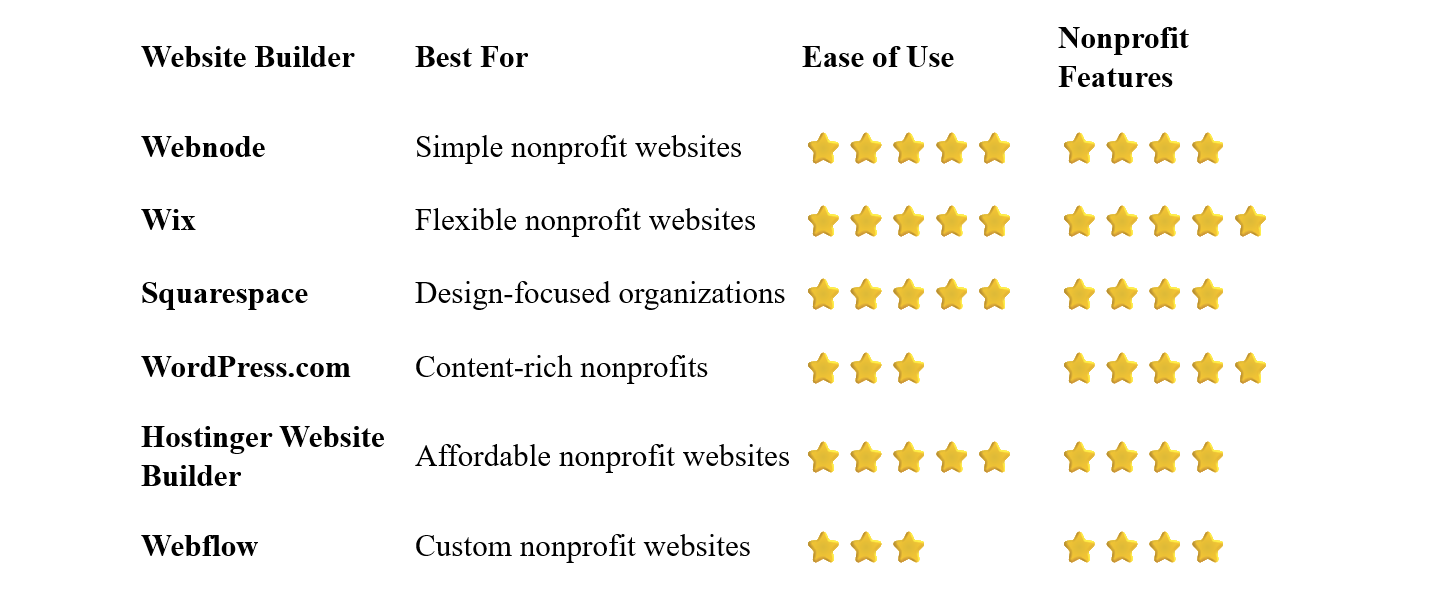
Webnode – Best for Simple Nonprofit Websites
Webnode is a good option for nonprofit organizations that want to create a professional website without complicated technology or coding.
Its visual editor makes it easy to create pages, add images, publish news, and update information.
A nonprofit can use Webnode to create pages explaining its mission, introduce team members, showcase projects, publish events, and provide contact information.
Webnode also provides forms, blogging, SEO tools, AI-powered website creation, custom domain options, and ecommerce functionality.
Why choose Webnode?
- Easy visual editor
- No coding required
- Professional templates
- Contact forms
- Blogging
- SEO tools
- Custom domain options
- AI website creation tools
- Ecommerce functionality
- Easy content management
This straightforward approach can be particularly useful for smaller organizations.
For example, a local community organization could create a website with information about its mission, upcoming events, volunteer opportunities, projects, and ways to support the organization.
Best for: Small nonprofits, charities, community organizations, clubs, and volunteer-led organizations that need a simple website.
Wix – Best for Flexible Nonprofit Websites
Wix offers extensive design flexibility and a broad range of business and organizational features.
Nonprofits can create pages for their mission, programs, campaigns, events, volunteers, and supporters.
The platform also supports forms, donations through available integrations, newsletters, blogging, ecommerce, and other tools.
This makes Wix a flexible option for organizations that want to build a more feature-rich website.
Best for: Nonprofits that want extensive customization and a wide range of features.
Squarespace – Best for Design-Focused Nonprofits
Squarespace is known for its polished templates and strong visual presentation.
For nonprofits, attractive design can help communicate the organization's mission and make projects and campaigns more engaging.
You can create pages for:
- Your mission
- Projects
- Impact
- Events
- News
- Team members
- Contact information
Squarespace can also be extended with donation and fundraising tools through available integrations.
Best for: Nonprofits that place a strong emphasis on branding and visual presentation.
WordPress.com – Best for Content-Rich Nonprofits
WordPress.com can be a powerful option for nonprofits that publish a lot of content.
Organizations can use articles and other content to share:
- News
- Campaign updates
- Research
- Success stories
- Volunteer experiences
- Educational resources
- Community information
This can also help organizations attract visitors through search engines.
WordPress offers considerable flexibility, but it generally requires more time and technical knowledge than simpler website builders.
Best for: Larger or content-heavy nonprofits that want extensive publishing capabilities.
Hostinger Website Builder – Best Affordable Option
Hostinger combines website building, hosting, templates, and AI-powered tools.
Its beginner-friendly approach can make it useful for small organizations that want to establish an online presence without a large website budget.
You can create pages, add images, publish content, and customize the website through a visual editor.
Best for: Small nonprofits, community groups, and organizations working with a limited budget.
Webflow – Best for Custom Nonprofit Websites
Webflow offers extensive control over website design and interactions.
This can be useful for larger organizations that want a distinctive website and have access to someone with web design experience.
The downside is its learning curve.
For a small nonprofit that simply needs information, donation links, and contact details, Webflow may provide more complexity than necessary.
Best for: Larger nonprofits and organizations that need a highly customized website.
What Should a Nonprofit Website Include?
A nonprofit website should make the organization's purpose immediately clear.
You don't need dozens of pages, but the most important information should be easy to find.
Homepage
The homepage should quickly answer:
- Who are you?
- What do you do?
- Who do you help?
- Why does your work matter?
- How can visitors help?
A clear call to action is important.
Depending on your organization, it might be:
Donate Now
Volunteer
Support Our Mission
Get Involved
About / Our Mission
Explain the organization's purpose and values.
Visitors should understand why the organization exists and what it is trying to accomplish.
Programs and Projects
Explain what your organization actually does.
Instead of simply saying that you "help the community," describe the specific programs, services, or initiatives you operate.
Impact
Show what your organization has achieved.
You can use:
- Statistics
- Stories
- Case studies
- Photographs
- Testimonials
- Annual reports
Specific evidence can help visitors understand how their support makes a difference.
Get Involved
Explain how people can participate.
For example:
- Volunteer
- Donate
- Attend an event
- Become a member
- Fundraise
- Spread awareness
Contact
Make it easy for visitors, volunteers, donors, journalists, and potential partners to contact you.
Should Nonprofits Accept Donations Online?
For many nonprofits, online donations can be extremely valuable.
A website can make giving convenient for supporters who want to contribute immediately.
Depending on your organization and website platform, you might use:
- Donation forms
- Payment processors
- Fundraising platforms
- Recurring donations
- Campaign-specific donation pages
Make sure the donation process is clear and trustworthy.
Explain where donations go and, where appropriate, provide information about how funds are used.
How Can a Nonprofit Build Trust Online?
Trust is particularly important when asking people for donations.
Consider including:
- Organization information
- Leadership or team information
- Contact details
- Financial information
- Annual reports
- Success stories
- Clear descriptions of programs
- Testimonials
- Partner organizations
- Relevant certifications or registrations
Don't overwhelm visitors with information, but make important details easy to find.
SEO can help people discover your organization when searching for information related to your mission.
Start with basic SEO:
- Use descriptive page titles
- Create useful content
- Use clear headings
- Optimize images
- Create descriptive URLs
- Link related pages together
- Make the website mobile-friendly
- Improve page loading speed
Create Pages for Your Main Programs
If your organization runs several different programs, consider creating a dedicated page for each major initiative.
For example:
Food Assistance Program
Youth Education Program
Animal Rescue
Community Support
This makes the website easier to navigate and can also help individual programs appear in relevant searches.
A nonprofit blog can cover:
- Project updates
- Success stories
- Educational articles
- Community news
- Volunteer stories
- Event announcements
- Campaign updates
This gives supporters reasons to return to the website while creating additional opportunities to attract search traffic.
How to Build a Nonprofit Website
1. Define Your Mission
Before building the website, clearly define what your organization does and who it helps.
2. Identify Your Main Audiences
You may be speaking to several groups:
- Donors
- Volunteers
- People who need your services
- Members
- Partners
- Journalists
- Community members
Make sure your website serves the most important audiences.
Select a platform based on your organization's needs, budget, and technical resources.
4. Choose a Professional Template
Look for a clean design that makes your mission and calls to action easy to understand.
Start with:
- Home
- About / Mission
- Programs
- Impact
- Get Involved
- Contact
Add a blog, events, donation pages, or other sections as needed.
6. Add Clear Calls to Action
Tell visitors what they can do.
Don't assume they will figure it out themselves.
7. Add Donation and Volunteer Options
If appropriate, make these options easy to find throughout the website.
A custom domain gives your organization a more professional online presence.
Make sure your donation forms, contact forms, navigation, and calls to action work properly on smartphones.
10. Keep the Website Updated
Regularly update:
- Events
- Campaigns
- News
- Contact information
- Team information
- Donation information
- Project results
An outdated nonprofit website can quickly undermine trust.
Common Nonprofit Website Mistakes
Unclear Mission
Visitors should understand what your organization does within seconds.
Too Much Text
Your website should provide enough information without overwhelming visitors.
Use headings, images, statistics, and short sections to make important information easy to scan.
Hidden Donation Button
If donations are important, don't make supporters search for the donation page.
No Evidence of Impact
Tell people what their support helps accomplish.
Outdated Information
Old events, incorrect contact information, or outdated campaigns can make the organization look inactive.
Difficult Mobile Experience
Many people will discover your organization through smartphones.
Make sure the website works well on smaller screens.
Complicated Navigation
Visitors should be able to find your mission, programs, donation options, and contact information quickly.
Which Website Builder Is Best for Nonprofits?
The best platform depends on the size and requirements of your organization.
Webnode is an excellent choice if you want a simple and intuitive website that staff or volunteers can manage without coding.
Wix offers extensive flexibility and a wide range of features for organizations that need a more customized website.
Squarespace is particularly attractive for nonprofits that place a strong emphasis on visual presentation and branding.
WordPress.com is worth considering for organizations that publish a lot of content and need extensive flexibility.
Hostinger Website Builder can be a practical option for smaller organizations with limited budgets.
Webflow is best suited to organizations that want a highly customized website and have access to more advanced design skills.
Final Thoughts
A nonprofit website should make it easy for people to understand your mission, see your impact, and get involved.
Whether someone wants to donate, volunteer, attend an event, receive help, or simply learn more about your organization, the path should be clear.
For smaller nonprofits that value simplicity and easy website management, Webnode can be a particularly appealing option. Its visual editor allows organizations to create and update their website without relying on a developer.
If you need more advanced functionality or extensive customization, platforms such as Wix or WordPress.com may be better suited to your requirements.
Start with a clear mission, explain your impact, make your calls to action prominent, and keep your content current. A well-designed nonprofit website can become an important tool for building awareness, attracting supporters, and growing your organization's impact.
⭐ Popular Guides ⭐
Looking for inspiration for your next website? Explore our popular guides for ideas and recommendations for different types of websites and online projects.


