

Best Website Builders for Photographers 2026
For photographers, a website can be much more than an online business card. It can serve as a portfolio, personal brand, booking tool, and source of new clients.
Whether you're a wedding photographer, portrait photographer, travel photographer, commercial photographer, or photography enthusiast, a professional website gives you a place to showcase your best work and explain what you offer.
You don't need to hire a web designer or learn how to code to create one. Modern website builders make it possible to build attractive photography websites using templates, visual editors, galleries, and other built-in tools.
The challenge is choosing a platform that combines beautiful presentation, ease of use, image galleries, mobile-friendly design, and useful business features.
In this guide, we'll look at the best website builders for photographers in 2026.
What Should Photographers Look for in a Website Builder?
Photography websites are highly visual, so image presentation should be one of your main considerations.
A good website builder for photographers should make it easy to:
- Create professional photo galleries
- Display large, high-quality images
- Organize photographs into categories
- Build a portfolio
- Create individual project pages
- Add contact forms
- Accept booking enquiries
- Add testimonials
- Connect social media
- Use a custom domain
- Optimize pages for search engines
- Create a mobile-friendly website
It's also important that adding new photographs doesn't become a complicated process.
Best Website Builders for Photographers in 2026
Here are some of the strongest options:
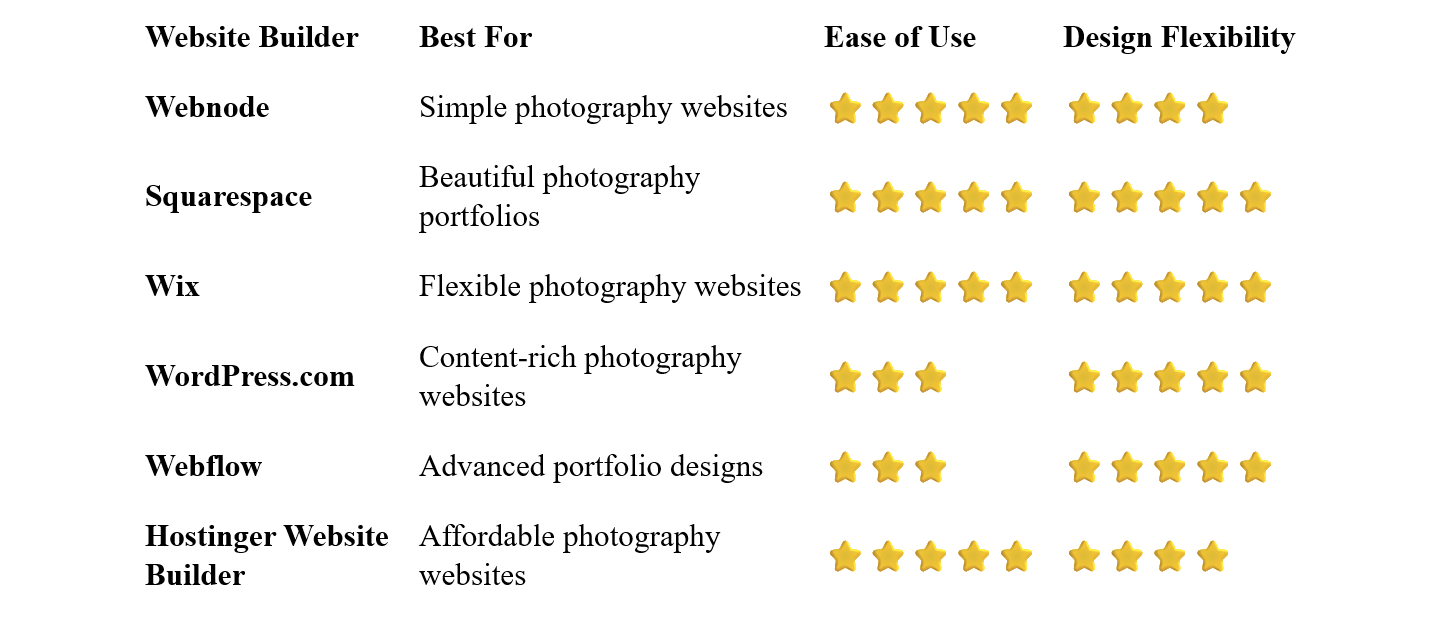
Webnode – Best for Simple Photography Websites
Webnode is a good option for photographers who want to create a professional website without dealing with complicated technology.
Its visual editor allows you to create pages, add photographs, arrange sections, and update your content without coding.
You can start with a portfolio or photography-oriented template and customize it with your own images, colors, text, logo, and branding.
Webnode also provides image galleries, forms, blogging, SEO tools, AI-powered website creation, and ecommerce functionality.
Why choose Webnode?
- Easy visual editor
- No coding required
- Portfolio-friendly templates
- Image galleries
- Contact forms
- SEO tools
- Custom domain options
- Blogging
- AI website creation tools
- Ecommerce functionality
For photographers who simply want to showcase their work and make it easy for potential clients to get in touch, this straightforward approach can be very appealing.
You can also update your portfolio yourself whenever you have new work to show.
Best for: Wedding photographers, portrait photographers, freelancers, and photographers who want a simple portfolio website.
Squarespace – Best for Photography Portfolios
Squarespace is particularly popular with creative professionals because of its strong emphasis on visual design.
Its templates can provide an elegant starting point for photography portfolios, with layouts designed to give images plenty of space.
You can create galleries, project pages, portfolios, blogs, contact pages, and ecommerce sections.
Squarespace can be especially attractive when the visual presentation of your website is an important part of your personal brand.
Best for: Photographers who prioritize visual presentation and polished portfolio design.
Wix – Best for Flexible Photography Websites
Wix offers a large selection of templates and extensive customization options.
Photographers can build portfolios, galleries, project pages, blogs, contact forms, booking pages, and online stores.
The visual editor gives you considerable control over the appearance and layout of your website.
This flexibility can be useful if you want your photography website to look very different from a standard portfolio.
Best for: Photographers who want extensive design flexibility and additional business features.
WordPress.com – Best for Content and SEO
WordPress.com can be a strong choice for photographers who want their website to include substantial amounts of written content.
For example, you could publish:
- Photography guides
- Travel stories
- Behind-the-scenes articles
- Equipment reviews
- Wedding photography tips
- Client stories
- Photography tutorials
This can help demonstrate your expertise while potentially attracting visitors from search engines.
The trade-off is that WordPress generally takes more time to learn and manage than simpler website builders.
Best for: Photographers who want to combine a portfolio with blogging and content marketing.
Webflow – Best for Advanced Portfolio Designs
Webflow provides extensive control over layouts, animations, interactions, and responsive design.
This makes it possible to create highly customized photography portfolios that don't necessarily look like traditional website templates.
However, Webflow has a steeper learning curve.
For photographers who simply want to upload photographs and create a portfolio quickly, it may be unnecessarily complex.
Best for: Experienced users and photographers who want a highly customized portfolio.
Hostinger Website Builder – Best Affordable Option
Hostinger combines website building, hosting, templates, and AI-powered tools.
It can be a practical option for photographers who want to establish an online presence without a large initial investment.
The beginner-friendly editor makes it relatively easy to create a portfolio, add images, and publish a website.
Best for: New photographers, hobbyists, freelancers, and photographers working with a limited budget.
What Should a Photography Website Include?
You don't need dozens of pages to create an effective photography website.
A simple structure can work extremely well.
Homepage
Your homepage should immediately communicate that you're a photographer.
Show some of your strongest images and provide a clear path to your portfolio.
Portfolio
This is usually the most important part of a photography website.
Choose your strongest work rather than simply uploading everything you've ever photographed.
Galleries
You can organize your work into categories such as:
- Weddings
- Portraits
- Landscapes
- Fashion
- Events
- Commercial
- Travel
- Family Photography
Only create categories that are relevant to your work.
About
Tell visitors who you are, what type of photography you specialize in, and what makes your approach different.
A professional photograph of yourself can also help potential clients connect with your brand.
Services
Explain what you offer.
For a wedding photographer, this might include wedding packages. A commercial photographer could describe corporate photography services, product photography, or advertising work.
Testimonials
If you work with clients, testimonials can help demonstrate the experience you provide.
Contact
Make it easy for potential clients to contact you.
Include a contact form, email address, phone number, or booking option.
How Many Photos Should You Put on Your Website?
More isn't necessarily better.
A common mistake is uploading hundreds of photographs simply because you have them.
Instead, select your strongest work.
Your portfolio should demonstrate:
- Your photography style
- Your technical ability
- Your preferred subjects
- The type of work you want to attract
If you specialize in wedding photography, for example, your portfolio should primarily showcase weddings rather than unrelated landscape photographs.
Should Photographers Sell Photos Online?
It depends on your business model.
A photographer selling prints, digital downloads, presets, books, or other products may benefit from ecommerce functionality.
For photographers who primarily sell services, however, a simple portfolio and enquiry system may be more important.
You can also combine both approaches.
For example, a wedding photographer could use the website primarily to generate bookings while also selling photography prints or albums.
Do Photographers Need a Blog?
Not necessarily.
A blog can be useful if you enjoy writing and want to attract search traffic, but your portfolio should remain the primary focus.
Potential topics include:
- Recent weddings
- Photography locations
- Behind-the-scenes stories
- Photography tips
- Equipment guides
- Client sessions
- Travel photography stories
A well-maintained blog can also give visitors more reasons to explore your website.
Photography Website SEO
Search engines can help potential clients discover your photography services.
Start with basic SEO:
- Create descriptive page titles
- Use clear headings
- Write useful descriptions
- Optimize image file sizes
- Use descriptive image filenames
- Add relevant alt text
- Create descriptive URLs
- Link related pages together
- Make your website mobile-friendly
Create Pages for Your Photography Services
If you specialize in several types of photography, dedicated pages can help visitors find exactly what they're looking for.
For example:
Wedding Photography
Portrait Photography
Family Photography
Commercial Photography
Each page can explain the service and showcase relevant examples of your work.
Consider Local SEO
If you primarily work in a particular area, make that clear.
A wedding photographer might target searches such as:
wedding photographer in Prague
or
wedding photographer in London
You can mention the locations you genuinely serve throughout your website without creating unnecessary pages for every possible location.
Image Optimization Matters
Photography websites can contain many large images, so performance deserves particular attention.
High-resolution photographs are important for presentation, but unnecessarily large files can slow down your website.
Consider:
- Resizing images appropriately
- Compressing photographs
- Using modern image formats when available
- Avoiding unnecessary full-resolution uploads
You want your photographs to look excellent without making visitors wait for them to load.
How to Build a Photography Website
1. Choose Your Photography Niche
Decide what type of photography you want to showcase.
Your website will be more effective if visitors immediately understand your specialty.
2. Select Your Best Photographs
Choose quality over quantity.
Your portfolio should represent the type of work you want to get more of.
Pick a platform that provides the visual presentation and features you need.
4. Choose a Portfolio Template
Start with a clean design that puts your photographs first.
5. Create Your Main Pages
A good starting structure could include:
- Home
- Portfolio
- Services
- About
- Contact
Add galleries, testimonials, blog posts, or other pages as needed.
6. Add Your Branding
Use your name or photography business name, logo, colors, and typography consistently.
A custom domain makes your photography business look more professional and easier to remember.
Many people will discover your work on smartphones.
Make sure galleries, images, menus, and contact forms work well on smaller screens.
9. Publish and Keep Your Portfolio Fresh
Replace weaker photographs with newer and stronger work as your portfolio develops.
Common Photography Website Mistakes
Showing Too Much Work
A huge portfolio can make it harder for visitors to see your best photographs.
Using Low-Quality Images
Your website is a representation of your photography.
Use your strongest images.
Slow Loading Times
Large image files can significantly affect performance.
Forgetting About Mobile
A beautiful desktop portfolio isn't enough.
Your website should look great on phones and tablets too.
No Clear Contact Option
Don't make potential clients search for a way to contact you.
Mixing Too Many Photography Styles
If you're trying to attract wedding clients, your website should make your wedding photography immediately visible.
Which Website Builder Is Best for Photographers?
The best choice depends on your priorities.
Webnode is an excellent option if you want a simple and intuitive way to create and manage a professional photography website without coding.
Squarespace is particularly attractive for photographers who place a high value on elegant visual presentation.
Wix offers extensive customization and a wide range of additional business features.
WordPress.com is worth considering if blogging and content marketing are important parts of your strategy.
Webflow provides advanced design control for photographers who want a highly customized portfolio.
Hostinger Website Builder can be a practical choice if affordability and simplicity are your main priorities.
Final Thoughts
For photographers, your website should put your work first.
A clean portfolio, attractive galleries, clear information about your services, and an easy way to contact you are often more important than having dozens of complicated features.
A website builder allows you to create that online presence without hiring a developer or learning how to code.
For photographers who value simplicity and easy website management, Webnode is a particularly appealing option. Its visual editor allows you to create a portfolio, add galleries, present your services, and update your work without dealing with complicated technical tools.
If design flexibility is your highest priority, Squarespace or Wix may be worth considering. If you want advanced customization, Webflow offers considerably more control.
Whichever platform you choose, focus on your strongest photographs, make the website easy to navigate, and give potential clients a clear reason to get in touch.
⭐ Popular Guides ⭐
Looking for inspiration for your next website? Explore our popular guides for ideas and recommendations for different types of websites and online projects.


