

Best Website Builders for Consultants 2026
For a consultant, your website is often one of the most important tools for building credibility and attracting new clients. Before someone books a consultation or contacts you, they may want to understand your expertise, experience, services, and approach.
A professional website gives you a place to communicate all of that clearly.
The good news is that you don't need to hire a web designer or learn how to code. Modern website builders make it possible to create a polished consulting website using templates, visual editors, and built-in business tools.
The challenge is finding a platform that combines professional design, simplicity, flexibility, and the features consultants actually need.
In this guide, we'll look at the best website builders for consultants in 2026 and what to consider when choosing one.
What Should Consultants Look for in a Website Builder?
A consulting website doesn't need hundreds of features. It needs to communicate expertise and make it easy for potential clients to take the next step.
Useful features include:
- Professional business templates
- Easy visual editing
- Service pages
- About pages
- Testimonials
- Case studies
- Contact forms
- Appointment scheduling
- Custom domain support
- Mobile-friendly design
- SEO tools
- Blogging
- Analytics
The ability to update the website yourself is also important.
Your consulting practice may evolve over time. You may introduce a new service, change your positioning, publish a new case study, or update your biography.
A good website builder should make these changes simple.
Best Website Builders for Consultants in 2026
Here are some of the strongest options:
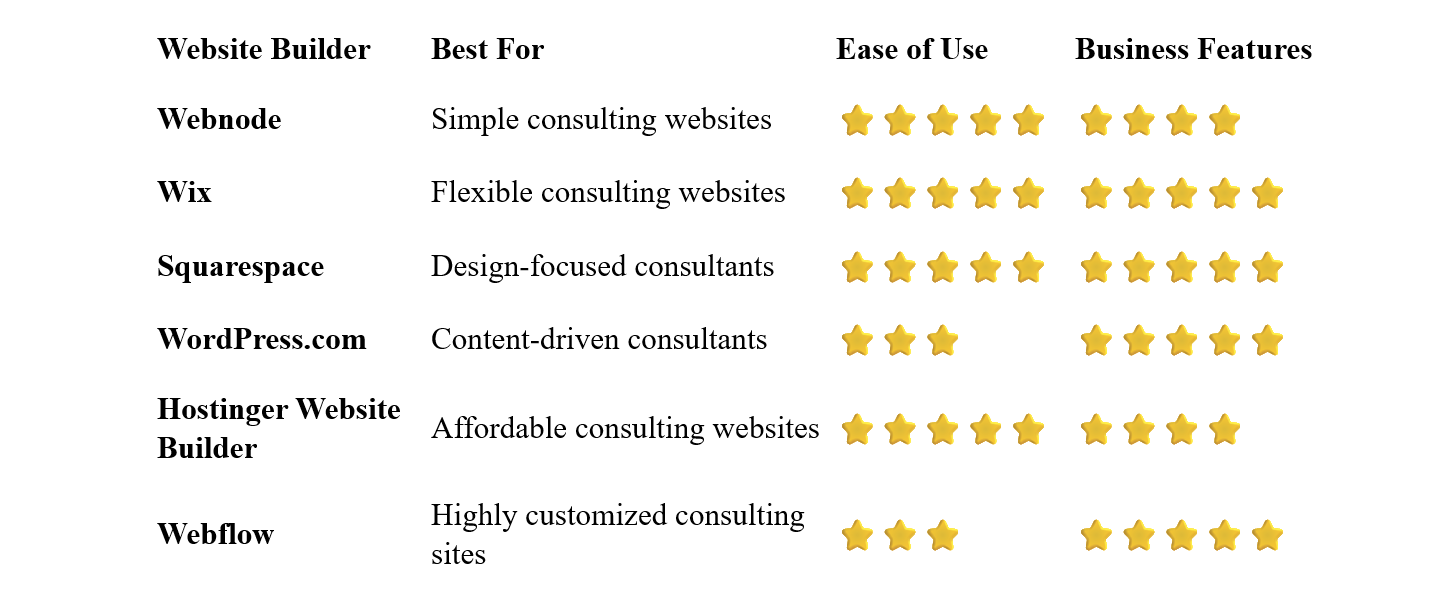
Webnode – Best for Simple Consulting Websites
Webnode is a strong choice for consultants who want a professional website without dealing with complicated technology.
Its visual editor lets you create pages, edit text, add images, and customize sections without coding.
You can start with a professional business template and adapt it to your consulting practice. Add your services, biography, qualifications, testimonials, case studies, and contact information.
Webnode also offers forms, SEO tools, blogging, AI-powered website creation, and ecommerce functionality.
Why choose Webnode?
- Easy visual editor
- No coding required
- Professional business templates
- Contact forms
- SEO tools
- Custom domain options
- Blogging
- AI website creation tools
- Ecommerce functionality
- Simple website management
For consultants, the ability to manage the website independently can be a major advantage.
You can update your services, add a new article, change your contact details, or publish a case study without relying on a developer.
Best for: Business consultants, marketing consultants, career consultants, financial consultants, coaches, and other independent professionals who want a straightforward website.
Wix – Best for Flexible Consulting Websites
Wix combines beginner-friendly website creation with extensive customization options.
Consultants can choose from business and professional service templates and customize them through the visual editor.
The platform also supports forms, appointment scheduling, payments, blogging, ecommerce, marketing tools, and AI-powered website creation.
This makes Wix particularly useful if your consulting business needs more than a simple informational website.
Best for: Consultants who want extensive customization and a broad range of business features.
Squarespace – Best for Design-Focused Consultants
Squarespace is an attractive option for consultants who want a polished and professional online presence.
Its templates tend to emphasize typography, spacing, imagery, and overall visual presentation.
This can work particularly well for management consultants, business advisors, coaches, creative consultants, architects, and other professionals where branding matters.
You can combine service pages with case studies, testimonials, blog content, booking tools, and other features.
Best for: Consultants who place a strong emphasis on branding and visual design.
WordPress.com – Best for Content-Driven Consultants
WordPress.com can be a strong choice if publishing content is an important part of your marketing strategy.
Consultants can use articles, guides, case studies, and other content to demonstrate expertise and attract potential clients through search engines.
For example, a marketing consultant might publish articles about SEO strategy, while a business consultant could create guides about business growth and management.
The downside is that WordPress generally has a steeper learning curve than simpler website builders.
Best for: Consultants who want to build authority through blogging and content marketing.
Hostinger Website Builder – Best Affordable Option
Hostinger combines website building, hosting, templates, and AI-powered tools.
It can be useful for consultants who want a professional website while keeping their initial costs relatively low.
The visual editor is designed for beginners, and AI tools can help generate an initial website structure and content.
Best for: New consultants, independent professionals, and consultants working with a limited website budget.
Webflow – Best for Advanced Consulting Websites
Webflow provides significantly more control over website design and interactions than beginner-focused platforms.
It can be a good choice for consulting firms or experienced designers who want a highly customized website.
The trade-off is that Webflow has a steeper learning curve.
For a solo consultant who simply needs a professional website, it may provide more complexity than necessary.
Best for: Consulting firms, design-focused professionals, and experienced users who want advanced customization.
What Should a Consultant's Website Include?
A consulting website doesn't need to be enormous.
A focused website with several well-written pages can be more effective than a large site filled with generic content.
Homepage
Clearly explain:
- What you do
- Who you help
- What problems you solve
- Why clients should choose you
Visitors should be able to understand your consulting offering quickly.
About
Your experience and expertise are particularly important in consulting.
Include relevant:
- Professional experience
- Qualifications
- Areas of expertise
- Industry experience
- Achievements
You don't need to list every detail of your career. Focus on what matters to potential clients.
Services
Explain the consulting services you provide.
For example:
- Business Strategy Consulting
- Marketing Consulting
- Financial Consulting
- HR Consulting
- IT Consulting
- Management Consulting
If you offer several distinct services, consider creating individual pages for important services.
Case Studies
Case studies can be particularly powerful for consultants.
Explain the client's challenge, your approach, and the outcome.
Where confidentiality prevents you from naming clients, you can create anonymized case studies when appropriate.
Testimonials
Client testimonials can help establish trust and demonstrate the value of your work.
Contact
Make it easy for potential clients to start a conversation.
A contact form, email address, phone number, or scheduling tool can all work.
Should Consultants Offer Online Booking?
It depends on your consulting model.
Online scheduling can be useful if you offer:
- Introductory consultations
- Discovery calls
- Coaching sessions
- Strategy sessions
- One-on-one consulting
- Fixed-duration appointments
If every potential project requires a detailed conversation before scheduling, a contact form may be more appropriate.
The goal is to reduce friction between a potential client and the first conversation.
Should Consultants Publish Their Prices?
There isn't a universal answer.
Some consultants prefer to publish starting prices or clearly defined packages.
Others use customized pricing because projects vary considerably.
Publishing prices can help qualify potential clients, while keeping pricing private gives you more flexibility.
If your services are standardized, showing pricing or packages can make the website more useful.
Do Consultants Need a Blog?
Not necessarily, but a blog can be valuable.
Consulting is based heavily on expertise and trust, so useful content can demonstrate your knowledge before a potential client ever contacts you.
You could publish:
- Industry insights
- How-to guides
- Case studies
- Research
- Frequently asked questions
- Professional opinions
- Practical advice
Don't create a blog simply because you think every website needs one. Publish content if it supports your marketing strategy.
How Much Does a Consulting Website Cost?
A consulting website can be relatively inexpensive to create with a website builder.
Potential costs include:
- Website builder subscription
- Domain registration
- Professional email
- Premium templates or images
- Scheduling software
- Marketing tools
A simple consultant website may only need a few pages, while a larger consulting firm may require more advanced functionality.
One advantage of using a website builder is that you can start small and expand as your consulting business grows.
Do Consultants Need Coding Skills?
No.
Website builders allow consultants to create and manage their websites through visual interfaces.
You can select a template, add sections, edit text and images, create pages, and publish changes without writing code.
This can be particularly useful for independent consultants who want complete control over their online presence without becoming web developers.
How to Build a Consulting Website
1. Define Your Positioning
Before building the website, decide exactly who you want to serve.
A consultant who tries to appeal to everyone can end up with a vague website.
Instead of simply saying:
Business Consultant
you might position yourself more specifically as:
Business Growth Consultant for Small Companies
A clear positioning makes the rest of the website easier to create.
Select a platform based on your current requirements and technical comfort level.
3. Choose a Professional Template
Look for a clean business or consulting template that puts your expertise and services at the center.
4. Create Your Core Pages
Start with:
- Home
- About
- Services
- Case Studies
- Contact
Add a blog, FAQ, testimonials, or additional service pages as needed.
5. Demonstrate Your Expertise
Don't just claim that you're experienced.
Show it through:
- Case studies
- Testimonials
- Qualifications
- Published content
- Client results
- Industry experience
6. Add a Clear Call to Action
Tell potential clients what to do next.
Examples include:
- Book a Consultation
- Schedule a Call
- Request a Proposal
- Contact Me
- Discuss Your Project
Use a professional domain that reflects your name or consulting brand.
Make sure your services, testimonials, contact forms, and calls to action work well on smartphones.
9. Keep Your Content Current
Update your website as your consulting practice evolves.
New experience, services, case studies, and insights can all strengthen your online presence.
SEO for Consultants
SEO can help potential clients discover your consulting services through search engines.
Start with the basics:
- Use descriptive page titles
- Create focused service pages
- Write useful content
- Optimize images
- Use descriptive URLs
- Add internal links
- Make the website mobile-friendly
- Improve page loading speed
Target Specific Services
Instead of trying to rank for an extremely broad term like consultant, create content around the services you actually provide.
For example:
Business Strategy Consultant
Marketing Consultant
SEO Consultant
HR Consultant
Financial Consultant
This can attract visitors who are already looking for a specific type of expertise.
Consider Your Target Market
You can also create content around the industries or audiences you serve.
For example:
Marketing Consultant for SaaS Companies
or
Business Consultant for Small Businesses
The more clearly your website communicates your specialization, the easier it is for potential clients to determine whether you're a good fit.
Common Consultant Website Mistakes
Being Too Generic
"Helping businesses achieve success" doesn't tell visitors much.
Be specific about your expertise and target clients.
Focusing Only on Your Qualifications
Your experience matters, but clients also want to know what you can do for them.
Connect your expertise to their problems and goals.
No Evidence of Results
Where possible, demonstrate your experience with case studies, testimonials, and measurable results.
Making It Difficult to Contact You
Don't hide your contact information.
Make the next step obvious.
Publishing Too Much Text
Consulting websites can easily become walls of text.
Use headings, short paragraphs, lists, images, and case studies to make the content easier to scan.
Ignoring Mobile Visitors
Your website needs to work well on smartphones and tablets as well as desktop computers.
Which Website Builder Is Best for Consultants?
The best option depends on your consulting business and how you plan to use your website.
Webnode is an excellent choice if you want a simple and intuitive way to create and manage a professional consulting website without coding.
Wix is a strong option if you want extensive customization and a broad range of business tools.
Squarespace is particularly attractive for consultants who place a high value on branding and visual presentation.
WordPress.com can be a good fit for consultants who plan to use blogging and content marketing extensively.
Hostinger Website Builder is worth considering if keeping your initial website costs low is important.
Webflow is a powerful choice for experienced users who want advanced design control.
Final Thoughts
For consultants, a website is ultimately about building trust and starting conversations.
Your visitors should quickly understand what you specialize in, who you help, and what they can expect from working with you. Your experience, case studies, testimonials, and useful content can then provide the evidence they need to take the next step.
For consultants who want a simple and intuitive website-building experience, Webnode is a particularly appealing option. Its visual editor allows you to build and maintain a professional consulting website without coding or relying on a developer for routine updates.
If you need more advanced design flexibility or specialized functionality, other platforms may be a better fit.
Choose the platform that matches your needs, focus your website on your ideal clients, demonstrate your expertise, and make it easy for potential clients to get in touch.
⭐ Popular Guides ⭐
Looking to create a website for your business? Explore our popular guides to find website builders suited to different types of businesses and professional needs.


