

Best Website Builders for Small Business 2026
A website is one of the most important parts of a small business's online presence. Whether you run a local shop, offer professional services, work as a freelancer, or operate a small online business, a good website can help potential customers discover you and understand what you offer.
The good news is that you don't need to hire a developer to create one.
Modern website builders make it possible to build a professional small business website using templates, visual editors, and AI-powered tools. The main challenge is choosing a platform that offers the right combination of simplicity, design, features, and cost.
In this guide, we'll look at the best website builders for small businesses in 2026 and help you find the right option for your business.
What Should a Small Business Website Builder Offer?
Small businesses don't usually need the most advanced website-building technology available. They need a platform that makes it easy to create and maintain a professional website.
Important features include:
- Easy visual editing
- Professional templates
- Mobile-friendly design
- Custom domain support
- Contact forms
- SEO tools
- Business information pages
- Blogging
- Social media integration
- Analytics
- Ecommerce options when needed
- Reliable hosting
Perhaps most importantly, the platform should be easy enough for the business owner to manage without technical expertise.
You shouldn't have to call a developer every time you want to change your opening hours or add a new service.
Best Website Builders for Small Business in 2026
Here are some of the strongest options:
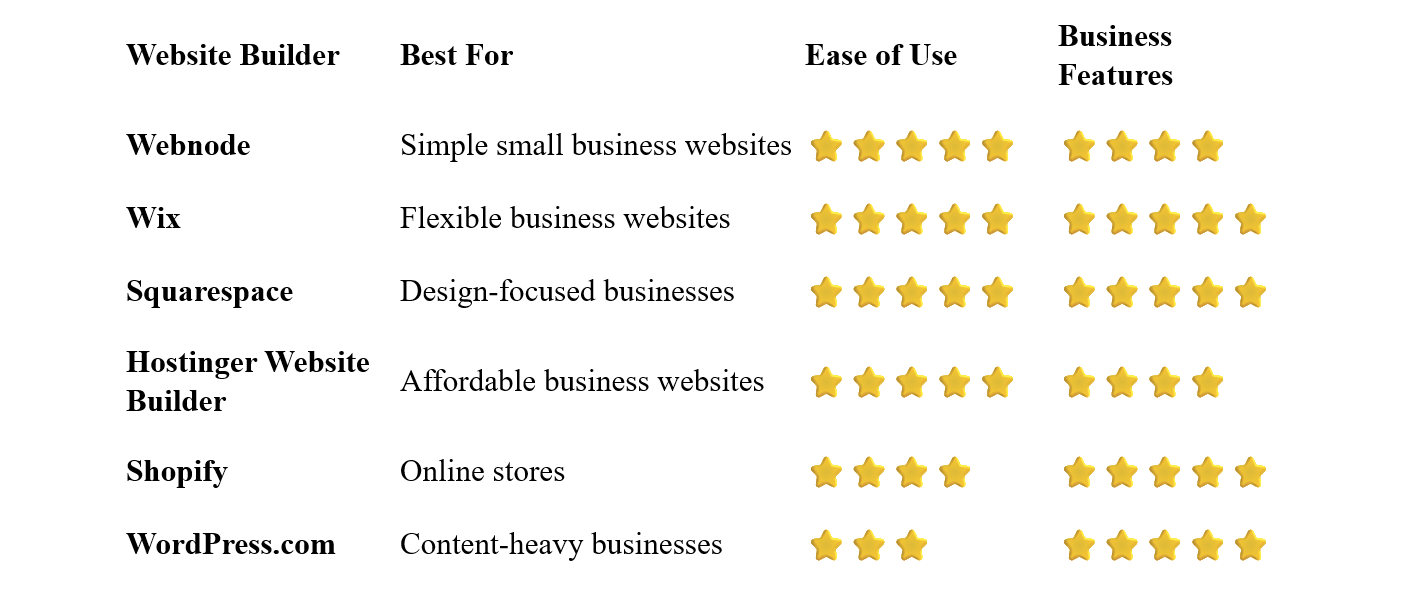
Webnode – Best for Simple Small Business Websites
Webnode is an excellent option for small businesses that want a professional website without dealing with complicated technology.
Its visual editor lets you create and edit pages without coding. You can start with a business template and customize the text, images, colors, sections, and navigation to match your company.
Webnode also provides AI-powered tools that can help you get started, while built-in features such as forms, blogging, SEO tools, and ecommerce options allow your website to grow with your business.
Why choose Webnode?
- Simple visual editor
- No coding required
- Business templates
- AI website-building tools
- Hosting included
- Custom domain options
- Contact forms
- SEO tools
- Blogging
- Ecommerce functionality
The biggest advantage for a small business owner is simply ease of management.
If you need to change a service description, update an image, publish an announcement, or add a new page, you can do it yourself.
Best for: Small businesses, local businesses, freelancers, professionals, and service providers who want a straightforward website-building experience.
Wix – Best for Flexible Small Business Websites
Wix is a versatile platform that can handle many different types of small business websites.
Its visual editor provides considerable design flexibility, while its templates cover industries ranging from restaurants and beauty services to consulting, real estate, and professional services.
Wix also offers business-oriented features such as forms, bookings, ecommerce, marketing tools, and AI-powered website creation.
The large number of available features can be an advantage, although beginners may need some time to become familiar with everything the platform offers.
Best for: Small businesses that want extensive customization and a broad range of features.
Squarespace – Best for Design-Focused Businesses
Squarespace is particularly attractive to small businesses where visual presentation plays an important role.
Its professionally designed templates can work well for restaurants, photographers, creative agencies, consultants, designers, and other businesses that want a polished online presence.
The platform combines visual website creation with blogging, ecommerce, scheduling, marketing, and other business features.
Best for: Creative businesses, restaurants, professional services, and companies that prioritize visual design.
Hostinger Website Builder – Best Affordable Option
Hostinger combines hosting, website-building tools, templates, and AI features in one platform.
It can be a good choice for small businesses that want to keep website costs under control while still having access to modern website-building tools.
The visual editor is designed for beginners, and AI tools can help create an initial website and content.
Best for: Startups, small businesses, freelancers, and businesses with a limited website budget.
Shopify – Best for Small Online Stores
Shopify is primarily focused on ecommerce.
If selling products online is the central purpose of your website, Shopify provides tools for managing products, inventory, payments, orders, shipping, and customers.
You can create and manage an online store without having to build the ecommerce infrastructure yourself.
For a business that only needs a simple informational website, Shopify may provide more functionality than necessary.
Best for: Small businesses whose main activity is selling products online.
WordPress.com – Best for Content-Heavy Small Businesses
WordPress.com can be a good choice for businesses that expect to publish a significant amount of content.
For example, consultants, publishers, agencies, and businesses using content marketing may appreciate the platform's flexibility.
The downside is that WordPress can require more time to learn than simpler website builders.
Best for: Businesses that rely heavily on blogs, articles, guides, and other content.
Which Website Builder Is Best for Your Small Business?
The best platform depends on what your business actually needs.
For a Local Small Business
A local business usually needs a simple website containing:
- Business description
- Services
- Opening hours
- Location
- Contact information
- Photos
- Customer reviews
Webnode, Wix, and Squarespace can all work well.
For a Service Business
If you sell services rather than physical products, look for a platform that makes it easy to explain your services and generate enquiries.
Webnode and Wix are strong options for this type of website.
For a Restaurant
Restaurants often need menus, photographs, opening hours, location information, and contact or reservation options.
Wix and Squarespace are particularly attractive for visually focused restaurant websites.
For an Online Store
If selling products online is the primary purpose of the website, Shopify is one of the strongest choices.
Other website builders can also support ecommerce, especially if you operate a smaller store and don't need a highly specialized ecommerce platform.
For a Professional Business
Consultants, agencies, accountants, lawyers, designers, and other professionals usually need a clean website focused on credibility and enquiries.
Webnode, Wix, and Squarespace can all provide the necessary foundation.
How Much Does a Small Business Website Cost?
The cost depends on how much functionality you need.
A very simple website can be created using a free plan, although free plans normally come with limitations such as a platform subdomain and restricted features.
For a professional business website, you'll generally want:
- Your own domain
- Professional hosting
- No platform advertising
- More storage
- Business features
- Analytics
- Possibly ecommerce or booking functionality
The good news is that a small business website doesn't necessarily need to cost thousands of dollars.
A website builder can reduce the cost significantly because you can create and manage the website yourself.
Do Small Businesses Need a Custom Domain?
Yes, in most cases.
A custom domain makes your business easier to find, remember, and trust.
For example:
smithplumbing.com
looks considerably more professional than:
smithplumbing.webnode.com
A custom domain is particularly important if you intend to use your website for advertising, business cards, email communication, or other long-term marketing.
Do You Need a Developer?
Usually not for a standard small business website.
A website builder can handle most of the technical work, including hosting, templates, responsive layouts, security, and many common website functions.
You can create and update your pages using a visual editor.
A developer becomes more useful when your business needs highly customized functionality, complex integrations, or a website that goes significantly beyond what a standard website builder can provide.
For a typical small business website, a website builder is often the simpler and more affordable solution.
What Pages Should a Small Business Website Have?
You don't need dozens of pages.
A basic small business website can often start with:
Home
Explain what your business does and why visitors should choose you.
About
Introduce your company, team, experience, or background.
Services
Clearly explain what you offer.
Contact
Make it easy for potential customers to get in touch.
Location
If customers visit your physical location, provide your address and relevant directions.
Testimonials
Customer reviews and testimonials can help establish trust.
FAQ
Answer common questions before visitors need to contact you.
You can add more pages as your business grows.
How to Build a Small Business Website
1. Decide What Your Website Needs to Do
Before choosing a platform, think about your goals.
Do you want more enquiries? More phone calls? Online bookings? Product sales? Or simply a professional online presence?
Select a platform that provides the features you actually need.
Don't choose a complicated platform simply because it has hundreds of features you'll never use.
Start with a template that matches your industry and the type of website you want to create.
4. Add Your Business Information
Add your logo, company name, services, contact information, photographs, and other relevant content.
5. Create Clear Calls to Action
Tell visitors what you want them to do.
Examples include:
- Contact Us
- Request a Quote
- Book an Appointment
- Call Now
- Get Directions
- Shop Now
6. Connect Your Domain
Choose a professional domain that's easy to remember and closely related to your business.
Many customers will discover your business using their smartphones.
Make sure your navigation, contact information, forms, and important buttons work well on smaller screens.
8. Publish and Maintain Your Website
Your website doesn't end when you click Publish.
Keep your opening hours, services, prices, photographs, and contact information up to date.
Small Business Website SEO
A website is only useful if potential customers can find it.
Basic SEO can help search engines understand what your website is about.
Start with:
- Clear page titles
- Descriptive URLs
- Relevant headings
- Useful original content
- Image alt text
- Internal links
- Mobile-friendly design
- Fast-loading pages
For local businesses, also make sure your business name, address, and contact information are consistent wherever your business appears online.
You don't need to become an SEO expert to get started. Focus first on creating a useful website for your customers.
Common Small Business Website Mistakes
Making the Homepage Too Complicated
Visitors should understand what your business does within seconds.
Hiding Contact Information
Make your phone number, email address, or contact form easy to find.
Using Low-Quality Images
Professional-looking photographs can make a significant difference, particularly for restaurants, hotels, retailers, and other visual businesses.
Forgetting Mobile Visitors
A website that only looks good on a desktop computer isn't enough anymore.
Adding Too Much Information
Give visitors the information they need without overwhelming them.
Never Updating the Website
Incorrect opening hours, outdated prices, or old promotions can damage your credibility.
Can You Build a Small Business Website Without Coding?
Absolutely.
Website builders such as Webnode, Wix, and Squarespace allow you to create and manage a business website without programming knowledge.
You can select a template, add sections, edit text and images, create pages, and publish your website through a visual interface.
This is particularly valuable for small business owners who don't want to depend on a developer for every small change.
Which Website Builder Is Best for Small Business?
There is no single platform that's perfect for every business.
Webnode is an excellent choice if you want a simple and intuitive way to create and manage a professional small business website.
Wix is a strong option if you want extensive customization and a large range of business features.
Squarespace is particularly attractive if design and visual presentation are important.
Hostinger Website Builder is worth considering if keeping costs low is a priority.
Shopify is the obvious option to consider when ecommerce is the main focus.
And WordPress.com can be a good fit for businesses that plan to publish a lot of content.
Final Thoughts
A small business website doesn't need to be complicated.
In most cases, the goal is simply to make your business easy to understand, easy to find, and easy to contact. A good website builder can provide everything you need to accomplish that without hiring a developer.
For small business owners who value simplicity and ease of use, Webnode is one of the strongest options to consider. Its visual editor makes it possible to create and manage a professional website without getting lost in technical settings.
If your business needs more advanced design flexibility, ecommerce, or specialized functionality, another platform may be a better fit.
The best approach is to choose a website builder that matches your actual business needs, start with the essentials, and expand your website as your business grows.
⭐ Popular Guides ⭐
Looking to create a website for your business? Explore our popular guides to find website builders suited to different types of businesses and professional needs.


