

Best Website Builders for Startups 2026
For a startup, a website is often one of the first places potential customers, investors, partners, and employees will encounter your company. It needs to explain what you do, communicate your value clearly, and make your new business look credible.
But building a startup website doesn't necessarily require a large development budget.
Modern website builders allow founders and small teams to create professional websites using templates, visual editors, AI tools, and ready-made business features. You can launch quickly and improve the website as the company grows.
The challenge is choosing a platform that provides the right combination of speed, design, flexibility, scalability, and cost.
In this guide, we'll look at the best website builders for startups in 2026 and help you decide which one fits your needs.
What Should a Startup Look for in a Website Builder?
Startups often need to move quickly.
You may want to launch a landing page this week, test your idea next month, and completely redesign the website six months later.
A good startup website builder should therefore offer:
- Fast website creation
- Professional templates
- Easy visual editing
- Mobile-friendly design
- Custom domain support
- SEO tools
- Contact forms
- Analytics
- Blogging
- Marketing integrations
- Ecommerce when needed
- Room to expand
It's also worth considering how easy the platform will be to manage once the startup becomes busier.
The founder shouldn't have to spend hours learning complicated web development simply to update a headline or add a new page.
Best Website Builders for Startups in 2026
Here are some of the strongest options:
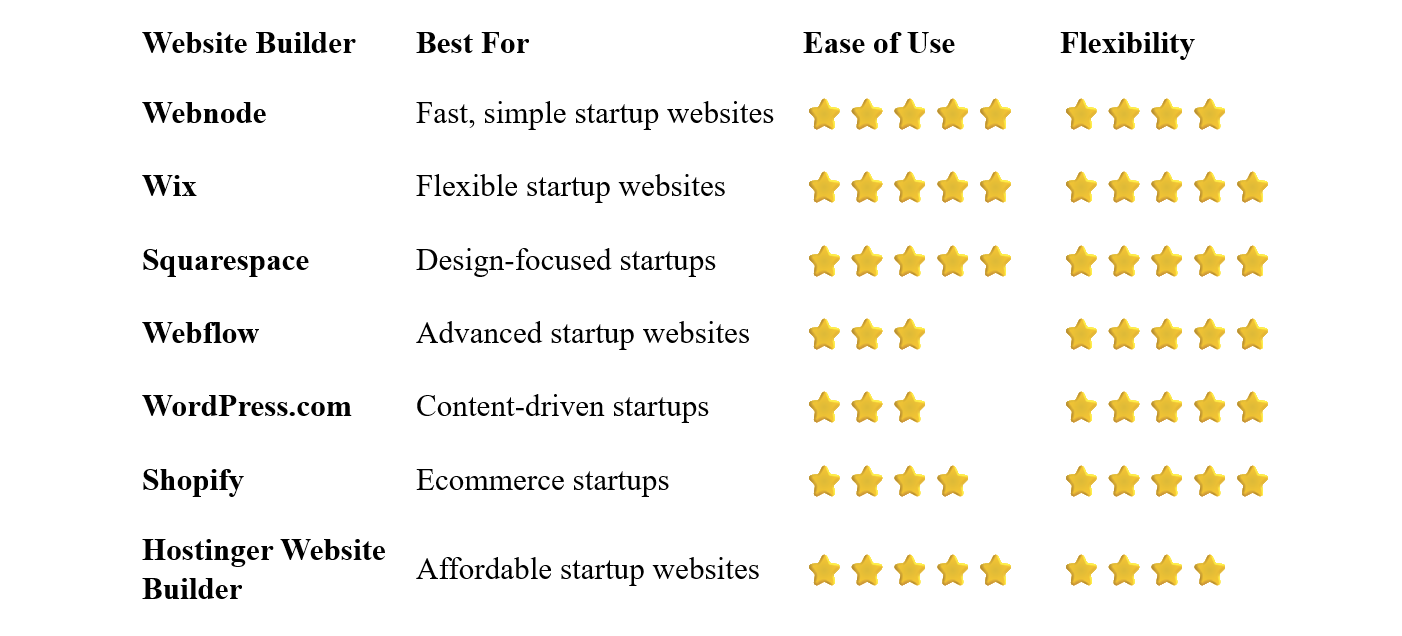
Webnode – Best for Simple Startup Websites
Webnode is a good choice for founders who want to get a professional website online without dealing with complicated web development.
Its visual editor makes it possible to create pages, modify layouts, add images, and update content without coding.
A startup can begin with a simple website containing a homepage, product or service information, an About page, and a contact section. Additional pages can be added as the business develops.
Webnode also provides AI-powered tools, SEO features, forms, blogging, and ecommerce functionality.
Why choose Webnode?
- Easy visual editor
- No coding required
- Professional templates
- AI website creation tools
- Custom domain options
- SEO tools
- Contact forms
- Blogging
- Ecommerce functionality
- Hosting included
For founders who want to launch quickly and manage the website themselves, simplicity can be a major advantage.
Best for: Early-stage startups, solo founders, small teams, and businesses that want a straightforward website-building experience.
Wix – Best for Flexible Startup Websites
Wix combines beginner-friendly website creation with extensive customization options.
Startups can choose from business templates and customize layouts, colors, typography, images, and other elements through the visual editor.
Wix also offers tools for forms, bookings, ecommerce, marketing, analytics, and AI-powered website creation.
This flexibility makes Wix suitable for many startup types, although the large number of available features can make the platform feel more complex than simpler alternatives.
Best for: Startups that want extensive customization and a broad selection of business features.
Squarespace – Best for Design-Focused Startups
Squarespace is particularly attractive for startups where branding and visual presentation are important.
Its professionally designed templates can provide a polished starting point for a new company website.
You can create landing pages, product pages, blogs, portfolios, contact pages, and ecommerce sections.
Squarespace is particularly well suited to startups in creative industries, professional services, hospitality, fashion, and other visually oriented markets.
Best for: Startups that prioritize branding and visual design.
Webflow – Best for Advanced Startup Websites
Webflow gives experienced users significantly more control over website design and interactions.
It can be useful for startups that want a highly customized marketing website without relying entirely on traditional development.
Webflow is particularly attractive to design teams and startups where the website itself is an important part of the brand experience.
The trade-off is a considerably steeper learning curve than beginner-focused platforms.
Best for: Design-focused startups, experienced teams, and companies that need advanced customization.
WordPress.com – Best for Content-Driven Startups
WordPress.com can be a strong option when content marketing is central to a startup's growth strategy.
You can create a company website and publish articles, guides, case studies, and other content.
This can be particularly useful for startups that expect to build organic search traffic over time.
WordPress offers considerable flexibility, although it can require more time to learn and manage than simpler website builders.
Best for: Startups focused heavily on blogging, SEO, content marketing, and publishing.
Shopify – Best for Ecommerce Startups
Shopify is designed primarily for businesses that sell products online.
It provides tools for product management, payments, inventory, orders, shipping, and ecommerce marketing.
For an ecommerce startup, having these capabilities integrated into the platform can be more important than having the most flexible visual editor.
If your startup is primarily a SaaS company, agency, or service business, however, Shopify may offer more ecommerce functionality than you need.
Best for: Ecommerce startups and businesses selling products online.
Hostinger Website Builder – Best Affordable Option
Hostinger combines website building, hosting, templates, and AI tools.
It can be a practical choice for founders who want to keep their initial website costs relatively low.
The platform is designed to make website creation accessible to beginners while providing enough functionality for a typical startup website.
Best for: Bootstrapped startups, solo founders, and businesses with a limited initial budget.
What Should a Startup Website Include?
A startup website doesn't need dozens of pages when you're just getting started.
A simple structure can be highly effective.
Homepage
Clearly explain what your company does and why it matters.
A visitor should understand your product or service quickly.
Product or Service
Explain what you're offering and how it solves a problem.
Avoid overwhelming visitors with unnecessary technical details.
About
Introduce the company and, where appropriate, the people behind it.
Pricing
If your startup has straightforward pricing, consider making it easy to find.
Features
Explain the most important features or benefits of your product.
Testimonials or Social Proof
Customer feedback, case studies, or other forms of social proof can help establish credibility.
Blog
A blog can support content marketing and SEO, although it isn't necessary for every startup.
Contact
Give visitors a clear way to contact your team.
Should a Startup Start With a One-Page Website?
Sometimes.
If you're validating an idea or preparing for launch, a simple one-page website can be enough.
It could include:
- Company name
- Short description
- Main benefit
- Product or service
- Key features
- Call to action
- Contact information
Once you have more information about your customers and product, you can expand the website.
This approach can help prevent spending too much time building pages that you don't yet need.
Do Startups Need a Custom Domain?
Yes.
A startup website should generally use a custom domain from the beginning.
Your domain will become part of your brand and may appear on:
- Business cards
- Email addresses
- Social media profiles
- Advertisements
- Presentations
- Product documentation
Choose something short, memorable, and closely connected to your startup's name or brand.
How Much Does a Startup Website Cost?
The cost depends on the complexity of your website.
A simple startup website can be created relatively inexpensively using a website builder.
Your initial costs may include:
- Website builder subscription
- Domain registration
- Professional email
- Premium images or graphics
- Marketing tools
- Ecommerce features, if required
A major advantage of using a website builder is that you can avoid the large upfront development costs associated with a custom-built website.
For an early-stage startup, keeping the initial website simple can be a sensible approach.
Do Startups Need a Developer?
Not necessarily.
If you are building a standard company website, a website builder can handle much of the technical work.
You can create pages, edit content, publish changes, and manage the website through a visual interface.
A developer becomes more important when you need custom applications, complex integrations, advanced databases, or functionality that a standard website builder cannot provide.
In other words, your startup website and your startup's product don't necessarily need to be built with the same technology.
You might use a simple website builder for your marketing website while your actual software product is developed using completely different technologies.
How to Build a Startup Website
1. Define Your Main Goal
Decide what you want visitors to do.
Do you want them to sign up, request a demo, buy a product, join a waiting list, or contact your team?
Select a platform based on your startup's current needs rather than hypothetical requirements years in the future.
Start with a clean business or startup template.
Don't spend weeks looking for the perfect design.
4. Create Your Core Pages
Begin with the essentials:
- Home
- Product or Services
- About
- Contact
Add additional pages when they become useful.
5. Explain Your Value Clearly
Your homepage should quickly answer three questions:
What do you offer?
Who is it for?
Why should someone care?
6. Add a Strong Call to Action
Tell visitors what to do next.
Examples include:
- Get Started
- Request a Demo
- Join the Waitlist
- Start Free
- Contact Us
- Learn More
7. Connect Your Domain
Use your own domain rather than relying on a free platform subdomain.
8. Test Everything
Check your website on desktop and mobile devices.
Test forms, buttons, links, navigation, and important calls to action.
9. Launch and Improve
Don't wait for the website to be perfect.
Launch it, collect feedback, and improve it as you learn more about your customers.
Startup Website SEO
SEO can become an important source of traffic as your startup grows.
Start with the fundamentals:
- Create descriptive page titles
- Use clear headings
- Write useful original content
- Optimize images
- Use descriptive URLs
- Link related pages together
- Make the website mobile-friendly
- Improve page loading speed
If your startup targets specific industries or problems, create useful pages that address those topics.
For example, a startup selling software to restaurants could create content specifically addressing the needs and challenges of restaurant businesses.
Common Startup Website Mistakes
Spending Too Much Time on Design
Your website doesn't need to be perfect before launch.
A clear message and functional website are more important than endless design adjustments.
Trying to Explain Everything
Your homepage should communicate the essential information first.
Visitors can explore additional pages if they want more detail.
No Clear Call to Action
Every important page should make the next step obvious.
Ignoring Mobile Users
Your customers may discover your startup from their phones.
Always test the mobile version.
Building for Hypothetical Future Needs
Don't choose the most complicated platform just because your startup might become huge one day.
Choose what makes sense now and upgrade your approach when necessary.
Forgetting to Update the Website
Your startup will change.
Keep product descriptions, pricing, team information, and other important details current.
Which Website Builder Is Best for Startups?
The right choice depends on the type and stage of your startup.
Webnode is a strong choice if you want a simple and intuitive way to launch and manage your website without coding.
Wix is worth considering if you want extensive customization and a broad selection of business features.
Squarespace is particularly attractive for startups that place a strong emphasis on branding and visual design.
Webflow is a powerful option for experienced teams that need advanced design control.
WordPress.com can be a good fit for content-driven startups focused on blogging and SEO.
Shopify is particularly suited to ecommerce startups.
And Hostinger Website Builder is worth considering when keeping initial costs low is important.
Final Thoughts
A startup website should help your company move forward, not become a project that consumes all of your time and resources.
Start with the information your customers actually need. Make your value proposition clear, provide an obvious next step, and use a platform that your team can manage without unnecessary technical complexity.
For founders who want to get a professional website online quickly and manage it themselves, Webnode is a particularly appealing option. Its intuitive visual editor makes it possible to build a business website without coding and expand it as your startup develops.
If your startup eventually needs highly customized functionality, you can always adopt more advanced tools as the company grows.
For most early-stage startups, however, the best website is not the most complicated one. It's the one that gets launched, communicates clearly, and helps the business grow.
⭐ Popular Guides ⭐
Looking to create a website for your business? Explore our popular guides to find website builders suited to different types of businesses and professional needs.


