

Best Website Builders for Local Businesses 2026
For a local business, having a website can make it much easier for potential customers to find you, learn about your services, check your opening hours, and get in touch.
Whether you run a restaurant, hair salon, repair service, retail shop, dental practice, fitness studio, or another local business, you don't necessarily need an expensive custom website.
Modern website builders allow small local businesses to create professional websites without hiring a developer or learning how to code. You can choose a template, add your business information, publish your website, and update it yourself.
The key is choosing a platform that combines simplicity, professional design, useful business features, and good local SEO capabilities.
In this guide, we'll look at the best website builders for local businesses in 2026.
What Should a Local Business Website Builder Offer?
A local business website has some specific requirements.
Customers often visit your website because they want a quick answer to a practical question:
Where are you located?
When are you open?
What do you offer?
How can I contact you?
A good website builder should therefore make it easy to add:
- Business address
- Opening hours
- Phone number
- Contact forms
- Services or products
- Prices or menus
- Maps
- Customer testimonials
- Photos
- Social media links
- SEO information
- Mobile-friendly pages
You should also be able to update your website easily when something changes.
Best Website Builders for Local Businesses in 2026
Here are some of the strongest options:
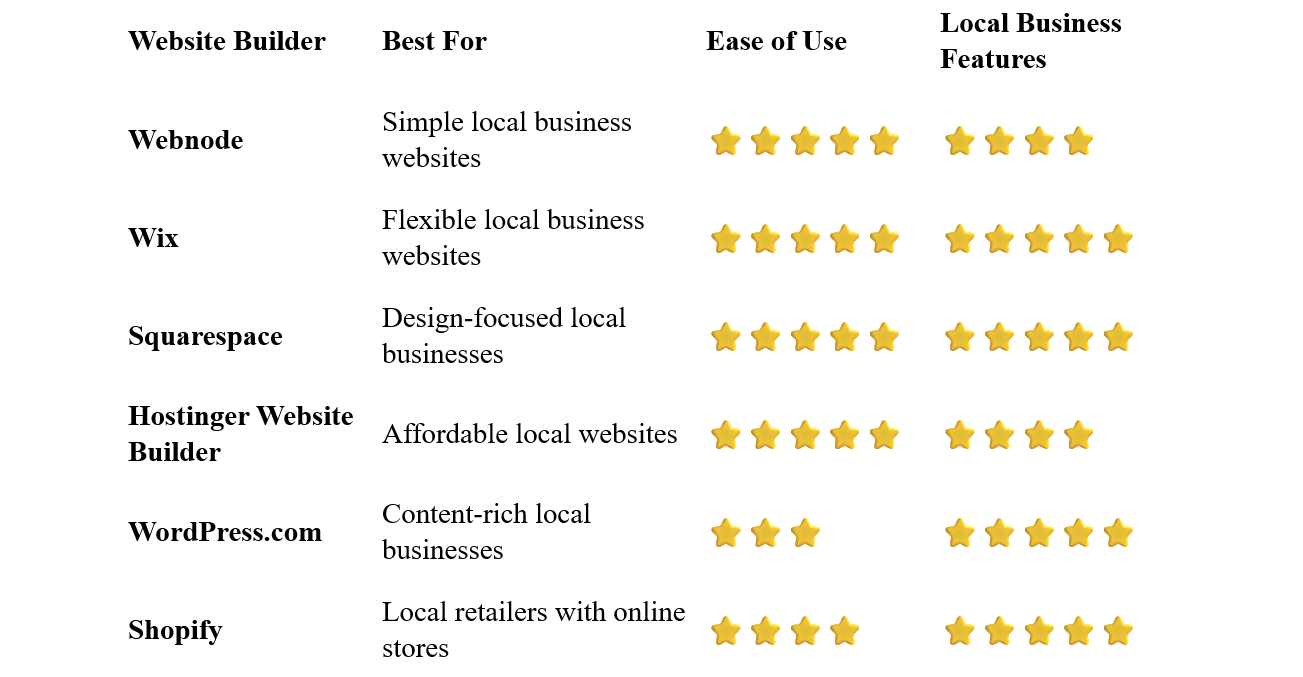
Webnode – Best for Simple Local Business Websites
Webnode is a particularly good option for local businesses that want a professional website without unnecessary complexity.
Its visual editor makes it easy to create pages, change content, add images, and organize your website without coding.
You can start with a business template and customize it with your own logo, colors, photographs, services, opening hours, and contact information.
Webnode also offers forms, SEO tools, blogging, AI-powered website creation, and ecommerce functionality.
Why choose Webnode?
- Easy visual editor
- No coding required
- Business templates
- Contact forms
- SEO tools
- Custom domain options
- Blogging
- Ecommerce functionality
- AI website creation tools
- Easy content management
For a local business owner, the ability to make changes yourself is particularly useful.
If your opening hours change for a holiday or you add a new service, you can update the website without waiting for a developer.
Best for: Restaurants, salons, tradespeople, professional services, shops, studios, and other local businesses that value simplicity.
Wix – Best for Flexible Local Business Websites
Wix provides extensive tools for local businesses.
Its templates cover many industries, including restaurants, beauty businesses, health and fitness, professional services, home services, and retail.
The visual editor provides considerable control over the design, while additional features can support bookings, forms, ecommerce, marketing, and other business needs.
Wix can be a particularly good choice if you want to build a more customized local business website.
Best for: Local businesses that want extensive design flexibility and a broad selection of business features.
Squarespace – Best for Design-Focused Local Businesses
Squarespace is a strong choice for businesses where visual presentation matters.
Its professionally designed templates can work particularly well for restaurants, hotels, salons, photographers, designers, fitness businesses, and other visually oriented companies.
You can create service pages, galleries, blogs, contact pages, booking functionality, and online stores.
Best for: Local businesses that want a polished and visually impressive website.
Hostinger Website Builder – Best Affordable Option
Hostinger combines hosting, website building, templates, and AI tools.
It can be a practical choice for a local business that wants to create a website while keeping initial costs relatively low.
The visual editor is designed for beginners, and AI tools can help generate an initial website structure and content.
Best for: Small local businesses, new businesses, and owners working with a limited website budget.
WordPress.com – Best for Content-Rich Local Businesses
WordPress.com can be useful for local businesses that plan to publish a lot of content.
For example, a local consultant, law firm, restaurant, or service business might use articles and guides to attract visitors through search engines.
WordPress offers considerable flexibility, but it generally requires more time to learn than simpler website builders.
Best for: Local businesses that want to combine their website with extensive blogging and content marketing.
Shopify – Best for Local Retailers
Shopify is particularly useful for local businesses that also sell products online.
A physical store can use Shopify to manage an online shop while maintaining a connection between its local and online business.
If you only need a simple website with an address, opening hours, services, and contact information, Shopify may be more functionality than you need.
Best for: Local retailers and businesses that want to sell products online.
What Should a Local Business Website Include?
A local business website doesn't need to be complicated.
A simple structure can work extremely well.
Homepage
Clearly explain what your business does and where you operate.
Include your most important service or product information and a clear call to action.
About
Introduce your business and explain what makes it different.
For local companies, mentioning your experience and connection to the local community can help build trust.
Services
List the services you provide.
Be specific and explain what customers can expect.
Location
Make your physical location easy to find.
Include your address and, when appropriate, directions or a map.
Opening Hours
Keep your opening hours accurate and easy to find.
This is especially important for restaurants, shops, salons, and other businesses that depend on walk-in customers.
Contact
Include your phone number, email address, contact form, or other relevant contact options.
Reviews and Testimonials
Positive customer feedback can provide valuable social proof.
Gallery
Photos can be particularly useful for restaurants, hotels, salons, gyms, stores, and other businesses where visual presentation matters.
Local SEO for Small Businesses
A website can help your business appear in search results when people look for your products or services in your area.
For example:
plumber in Chicago
Italian restaurant in London
hair salon near me
photographer in Manchester
Your website should make it clear what you offer and where you operate.
Use Location-Specific Content
Mention the towns, cities, neighborhoods, or regions you actually serve.
Don't simply add lists of locations where you don't have a genuine presence.
Optimize Page Titles
Use descriptive titles that explain both the service and location when appropriate.
For example:
Residential Plumber in Denver | ABC Plumbing
is more informative than:
Home
Create Useful Service Pages
If you offer several services, consider creating individual pages for important services.
This gives both visitors and search engines more specific information.
Keep Your Business Information Consistent
Your business name, address, and phone number should be accurate and consistent across your website and other online listings.
Make the Website Mobile-Friendly
Local searches are frequently performed on smartphones.
Your website should make it easy for mobile visitors to call you, find your location, or request information.
Do Local Businesses Need a Custom Domain?
A custom domain is strongly recommended.
A professional domain makes your business easier to remember and gives your website a more established appearance.
For example:
smithplumbing.com
is preferable to a long platform-specific web address.
Your domain can also be used for a professional business email address.
How Much Does a Local Business Website Cost?
A local business website can cost very little to get started with a website builder.
You may have to pay for:
- Website builder subscription
- Domain registration
- Professional email
- Premium images
- Booking tools
- Ecommerce functionality
The exact cost depends on your requirements.
A simple service business may need only a few pages, while a restaurant with menus, reservations, galleries, and online ordering will need more functionality.
One of the biggest advantages of website builders is that you can start small and add features when you actually need them.
Do You Need a Developer?
For most standard local business websites, no.
A website builder can handle much of the technical work.
You can create pages, add images, update your opening hours, publish new information, and manage your website through a visual editor.
A developer becomes more useful when you need custom functionality that goes beyond what a website builder provides.
For example, a highly specialized booking system or custom business application may require professional development.
But for a typical local business website, a website builder is usually sufficient.
How to Build a Local Business Website
1. Define Your Main Goal
Decide what you want visitors to do.
Do you want them to call you, visit your location, request a quote, book an appointment, or make an online purchase?
Pick a platform based on your business needs rather than simply choosing the one with the longest feature list.
3. Select a Local Business Template
Choose a template that matches your industry and the type of website you want to create.
4. Add Your Business Information
Include:
- Business name
- Address
- Phone number
- Opening hours
- Services
- Prices where appropriate
- Photos
5. Add a Clear Call to Action
Make the next step obvious.
Depending on your business, this might be:
- Call Now
- Get Directions
- Book an Appointment
- Request a Quote
- Contact Us
- Visit Our Store
Use a short and memorable domain associated with your business.
Check the website on a smartphone and make sure the most important information is easy to access.
8. Publish and Keep It Updated
Review your website regularly.
Update opening hours, services, prices, promotions, photographs, and other important information when necessary.
Common Local Business Website Mistakes
Hiding the Address
If customers visit your physical location, make your address easy to find.
Outdated Opening Hours
Incorrect opening hours can frustrate customers and damage trust.
No Phone Number
If phone calls are important to your business, don't hide your number behind several clicks.
Poor Mobile Design
A local customer may find your business through a smartphone while standing nearby.
Make sure your site works well on mobile devices.
Too Much Information on the Homepage
Give visitors the essentials first.
They can explore additional pages if they want more detail.
Ignoring Local Search
Make sure your website clearly communicates your business type and service area.
Which Website Builder Is Best for Local Businesses?
The best choice depends on your business and the features you need.
Webnode is an excellent choice if you want a simple, intuitive website that you can create and maintain yourself.
Wix is a strong option if you want extensive customization and a wide range of business features.
Squarespace is particularly attractive for businesses that want a polished visual design.
Hostinger Website Builder is worth considering when affordability is important.
WordPress.com can work well for local businesses that want to invest heavily in content marketing.
Shopify is particularly useful for local retailers that also want to sell online.
Final Thoughts
A local business website doesn't have to be complicated or expensive.
The most important thing is to make it easy for potential customers to understand what you offer, where you're located, when you're open, and how they can contact you.
A website builder can provide everything you need to create that online presence without requiring coding skills or a large development budget.
For local business owners who value simplicity and easy website management, Webnode is a particularly appealing option. Its visual editor allows you to create and update a professional website without dealing with complicated technical settings.
If your business needs advanced design flexibility, ecommerce, bookings, or other specialized features, Wix, Squarespace, or Shopify may be worth considering.
Start with the essentials, make your website useful for local customers, and expand it as your business grows.
⭐ Popular Guides ⭐
Looking to create a website for your business? Explore our popular guides to find website builders suited to different types of businesses and professional needs.


