

Best Website Builders for Freelancers 2026
For freelancers, a website can be much more than an online business card. It can showcase your work, explain your services, build credibility, attract new clients, and give potential customers an easy way to contact you.
The good news is that you don't need to hire a web designer or learn how to code to create a professional freelance website.
Modern website builders make it easy to choose a template, customize your pages, add your portfolio, and publish your website. The challenge is finding a platform that gives you the right balance of professional design, simplicity, flexibility, and useful business features.
In this guide, we'll look at the best website builders for freelancers in 2026 and help you choose the right option for your freelance business.
What Should a Freelancer Look for in a Website Builder?
Freelancers usually don't need a complicated website.
What matters is being able to present your skills and services clearly while making it easy for potential clients to get in touch.
Look for features such as:
- Professional templates
- Easy visual editing
- Portfolio and project pages
- Contact forms
- Custom domain support
- Mobile-friendly design
- SEO tools
- Blogging
- Social media integration
- Booking or scheduling features
- Ecommerce options when relevant
The most important factor may be how easy the website is to maintain.
As a freelancer, your time is valuable. You probably don't want to spend hours figuring out how to change a headline or add a new project.
Best Website Builders for Freelancers in 2026
Here are some of the strongest options:
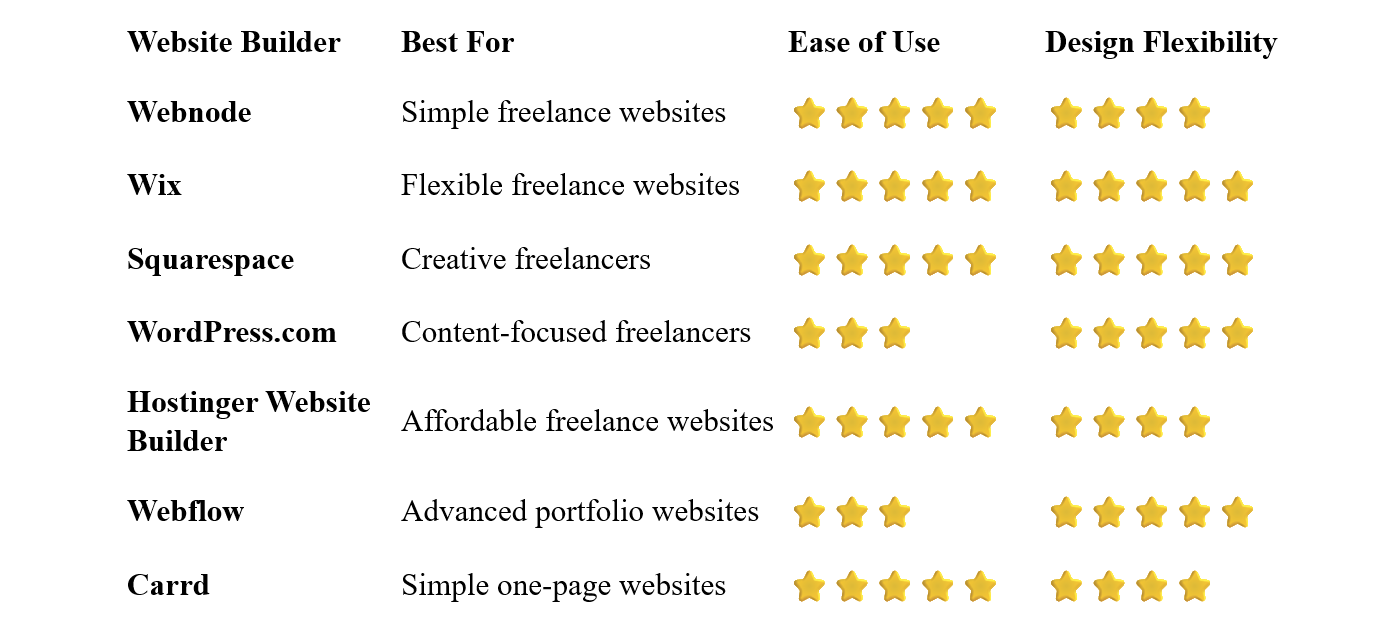
Webnode – Best for Simple Freelance Websites
Webnode is a strong option for freelancers who want a professional website without spending too much time on technical details.
Its visual editor makes it easy to create pages, add images, edit text, and organize your content without coding.
You can start with a professional template and adapt it to your freelance business. Add your services, portfolio, testimonials, biography, and contact information, then publish your website.
Webnode also includes tools for SEO, blogging, forms, and ecommerce, giving you room to expand your website as your freelance business grows.
Why choose Webnode?
- Easy visual editor
- No coding required
- Professional templates
- Portfolio-friendly layouts
- Contact forms
- SEO tools
- Blogging
- Custom domain options
- Ecommerce functionality
- AI-powered website creation tools
One of Webnode's biggest advantages for freelancers is that you can manage the website yourself.
If you need to add a new service or update your portfolio, you don't have to contact a developer.
Best for: Freelancers, consultants, professionals, and beginners who want a simple and professional website.
Wix – Best for Flexible Freelance Websites
Wix offers a high level of design flexibility while remaining accessible to beginners.
Freelancers can choose from templates designed for photographers, designers, writers, consultants, coaches, marketers, developers, and many other professions.
The visual editor allows you to customize layouts, galleries, fonts, colors, and other elements without coding.
Wix also provides business features such as forms, bookings, ecommerce, marketing tools, and AI-powered website creation.
The downside is that the large number of options can make the platform feel more complicated than simpler website builders.
Best for: Freelancers who want extensive control over their website design and features.
Squarespace – Best for Creative Freelancers
Squarespace is particularly well suited to freelancers whose work is highly visual.
Photographers, designers, artists, architects, copywriters, and other creative professionals can benefit from its polished templates and strong presentation of images and projects.
You can create portfolio pages, galleries, blogs, contact pages, service pages, and ecommerce sections.
Squarespace is easy to use, but users looking for complete design freedom may find it less flexible than Webflow.
Best for: Designers, photographers, artists, and other creative freelancers.
WordPress.com – Best for Content-Focused Freelancers
WordPress.com can be a good choice if content marketing is an important part of your freelance business.
For example, consultants, writers, marketers, and coaches can use a combination of service pages, articles, guides, and case studies to demonstrate their expertise.
WordPress provides considerable flexibility, but it generally has a steeper learning curve than beginner-focused website builders.
Best for: Writers, consultants, bloggers, marketers, and freelancers who plan to publish lots of content.
Hostinger Website Builder – Best Affordable Option
Hostinger combines website building, hosting, templates, and AI tools in one platform.
It can be attractive to freelancers who want to keep their initial website costs relatively low.
The visual editor is designed for beginners, and AI tools can help with the initial website structure and content.
Best for: New freelancers, students, and professionals looking for an affordable website-building solution.
Webflow – Best for Advanced Portfolio Websites
Webflow is aimed at users who want considerably more control over the visual design and functionality of their websites.
It can be an excellent platform for experienced designers and digital professionals who want to create highly customized portfolios.
However, Webflow has a noticeably steeper learning curve than Webnode, Wix, or Squarespace.
Best for: Experienced designers, developers, and creative professionals who want advanced design control.
Carrd – Best for Simple One-Page Freelance Websites
Carrd is designed around simple one-page websites.
For a freelancer who only needs a short introduction, list of services, selected work, and contact information, this can be enough.
A simple website can also be useful when you're just starting your freelance career and don't yet need a large portfolio.
Best for: Freelancers who need a simple one-page website.
What Should a Freelancer's Website Include?
A freelance website doesn't need dozens of pages.
A simple structure can be extremely effective.
Homepage
Explain what you do, who you help, and what makes your services valuable.
Visitors should understand your profession within a few seconds.
About
Tell potential clients a little about yourself and your professional background.
You don't need to write a long biography. Focus on information that helps establish credibility.
Services
Explain exactly what you offer.
Be specific about the problems you solve rather than simply listing professional titles.
Portfolio
Show examples of your best work.
For each project, you can include:
- Project name
- Short description
- Your role
- Images or screenshots
- Tools used
- Results
- Link to the finished project
Testimonials
Client testimonials can provide valuable social proof.
Even a few genuine testimonials can help potential customers feel more comfortable contacting you.
Contact
Make contacting you easy.
A simple contact form, email address, or booking link can be enough.
Do Freelancers Need a Portfolio?
Not always.
A portfolio is particularly important for freelancers whose work is visual or project-based, such as:
- Designers
- Photographers
- Developers
- Writers
- Illustrators
- Video editors
- Architects
- Marketing professionals
However, even service-based freelancers can benefit from showing examples of previous work.
If you can't publish client work, consider creating case studies or examples that demonstrate what you can do.
Should Freelancers Use Their Own Name as a Domain?
Often, yes.
If you are building a personal freelance brand, using your own name can be a good long-term choice.
For example:
janedoe.com
is simple and can remain relevant even if your services change over time.
Alternatively, you can choose a business or studio name if you plan to build a larger agency or brand.
The important thing is to choose a domain that is easy to remember and looks professional.
Do You Need Coding Skills to Build a Freelance Website?
No.
Website builders allow you to create a professional freelance website without writing HTML, CSS, JavaScript, or other code.
You can choose a template, add sections, edit text and images, and publish the website using a visual editor.
This is especially useful for freelancers because you can build the website yourself and spend your budget on your business rather than paying someone else for every update.
How to Build a Freelance Website
1. Define Your Services
Before opening a website builder, decide what you actually want to offer.
Try to be specific.
Instead of simply saying:
Graphic Designer
you might say:
Brand Identity Design for Small Businesses
A clear offer helps visitors understand whether you're the right freelancer for them.
Choose a platform that matches your technical skills and the complexity of your website.
Start with a template designed for freelancers, portfolios, or your specific profession.
4. Create Your Core Pages
Start with:
- Home
- About
- Services
- Portfolio
- Contact
You can add other pages later.
5. Add Your Best Work
Don't try to include everything you've ever created.
Select projects that demonstrate the type of work you want to attract.
6. Add Testimonials
If you have satisfied clients, ask whether they would be willing to provide a short testimonial.
7. Add a Clear Call to Action
Tell visitors what they should do next.
Examples include:
- Contact Me
- Request a Quote
- Book a Consultation
- Start a Project
- Get in Touch
8. Connect Your Domain
A custom domain makes your freelance business look more established.
Check your website on a smartphone before publishing.
Your portfolio, contact form, navigation, and buttons should all work properly on smaller screens.
How Much Does a Freelance Website Cost?
The cost can vary significantly depending on the platform and features you choose.
A free website builder plan can be enough to experiment with your first portfolio.
However, professional freelancers will usually benefit from a paid plan that provides a custom domain and additional features.
You may also need to budget for:
- Domain registration
- Premium templates
- Stock photography
- Professional email
- Booking tools
- Ecommerce functionality
The good news is that a basic freelance website can be created without a large upfront investment.
SEO for Freelancers
SEO can help potential clients discover your website through search engines.
Start with the basics:
- Use descriptive page titles
- Write clear headings
- Create useful service pages
- Optimize images
- Use descriptive URLs
- Add internal links
- Make your website mobile-friendly
- Publish useful content when appropriate
You can also create pages targeting specific services or locations.
For example, a freelance photographer might create pages for:
Wedding Photography
Portrait Photography
Commercial Photography
This can help visitors find exactly the service they're looking for.
Common Freelancer Website Mistakes
Trying to Appeal to Everyone
A website becomes more effective when it clearly communicates who you help.
Showing Too Much Work
Your best projects are more important than the number of projects you display.
Focusing Too Much on Yourself
Potential clients want to know what you can do for them.
Talk about their problems and desired outcomes, not only your qualifications.
No Clear Call to Action
Don't make visitors guess how to start working with you.
Using an Unprofessional Email Address
If possible, use an email address associated with your own domain.
Forgetting Mobile Optimization
A portfolio that looks great on a large monitor can still be difficult to use on a smartphone.
Which Website Builder Is Best for Freelancers?
There isn't one perfect website builder for every freelancer.
Webnode is an excellent choice if you want a simple, intuitive way to create and manage a professional freelance website.
Wix is a strong option for freelancers who want more design flexibility and a wide selection of business features.
Squarespace is particularly attractive for creative professionals who want polished visual presentation.
WordPress.com works well for freelancers who plan to use blogging and content marketing heavily.
Hostinger Website Builder is worth considering if affordability is important.
Webflow is a powerful option for experienced designers who want advanced control.
And Carrd can be enough if all you need is a simple one-page freelance website.
Final Thoughts
A freelancer's website doesn't need to be complicated.
Your goal is to communicate what you do, who you help, and why potential clients should choose you. Your portfolio and experience should remain the focus, while the website provides a professional framework around them.
For freelancers who value simplicity, Webnode is a particularly appealing option. Its visual editor allows you to build and maintain a professional website without needing coding skills or advanced technical knowledge.
If you need extensive design customization, Wix or Squarespace may be better suited to your needs. More experienced designers can also consider Webflow.
Choose the platform that fits your workflow, showcase your strongest work, make contacting you easy, and keep your website updated as your freelance business grows.
⭐ Popular Guides ⭐
Looking to create a website for your business? Explore our popular guides to find website builders suited to different types of businesses and professional needs.


