

Best Website Builders for Service Businesses 2026
If your business sells services rather than physical products, your website needs to do one thing particularly well: turn visitors into potential customers.
Whether you're a consultant, lawyer, accountant, plumber, photographer, cleaning company, marketing agency, personal trainer, or another service provider, your website should clearly explain what you offer and make it easy for people to contact you.
You don't necessarily need a custom website or coding skills to achieve this. Modern website builders make it possible to create professional service business websites using templates, visual editors, and built-in business tools.
The challenge is choosing a platform that offers the right combination of simplicity, professional design, flexibility, and features for selling services.
In this guide, we'll look at the best website builders for service businesses in 2026 and what to consider before choosing one.
What Should a Service Business Look for in a Website Builder?
Service businesses have different needs from online stores.
Instead of managing products and inventory, your website will usually focus on explaining your services, establishing credibility, and generating enquiries or bookings.
Useful features include:
- Professional templates
- Easy visual editing
- Service pages
- Contact forms
- Appointment booking
- Custom domain support
- Mobile-friendly design
- SEO tools
- Blogging
- Testimonials
- Photo galleries
- Maps and location information
- Ecommerce when relevant
The website should also be easy to update.
If you add a new service or change your prices, you shouldn't need a developer to make the update.
Best Website Builders for Service Businesses in 2026
Here are some of the strongest options:
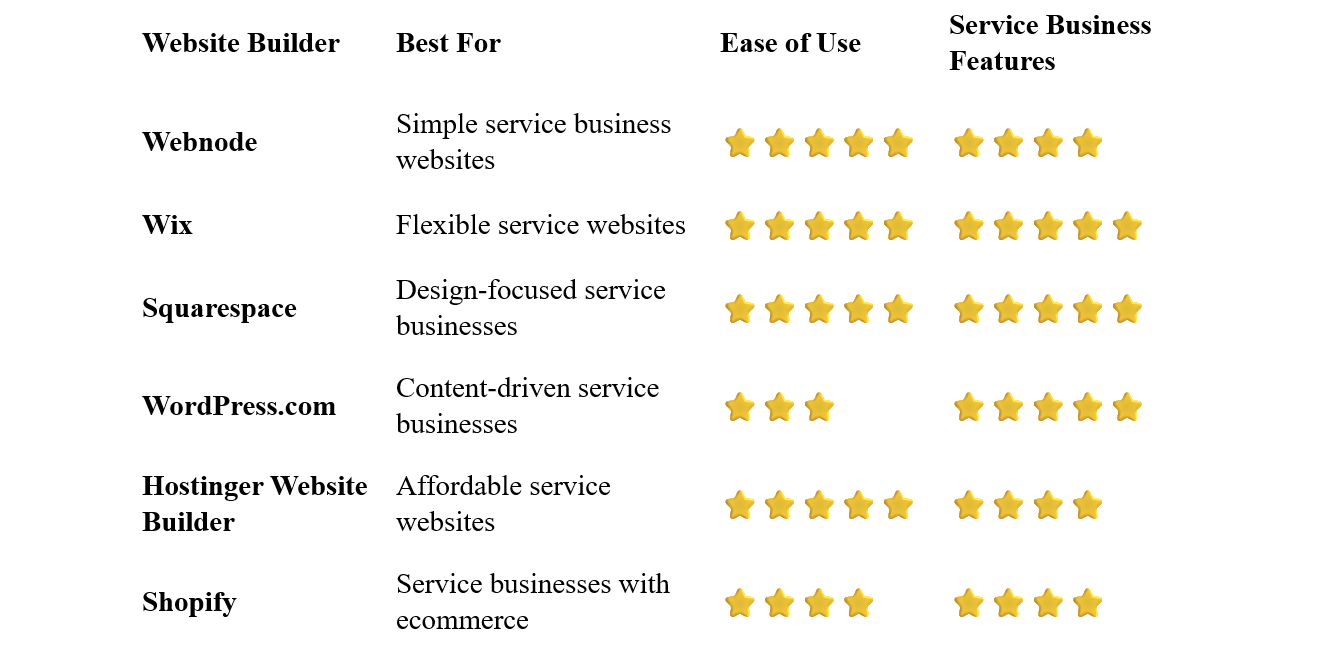
Webnode – Best for Simple Service Business Websites
Webnode is a strong option for service businesses that want a professional website without complicated setup or coding.
Its visual editor allows you to create pages, edit text and images, and arrange website sections without technical knowledge.
You can start with a business template and customize it for your company. Add your services, prices, testimonials, contact information, photographs, and other relevant content.
Webnode also provides contact forms, SEO tools, blogging, AI-powered website creation, and ecommerce functionality.
Why choose Webnode?
- Simple visual editor
- No coding required
- Professional business templates
- Contact forms
- SEO tools
- Custom domain options
- Blogging
- AI website creation tools
- Ecommerce functionality
- Easy website management
For a service business owner, this simplicity can be particularly valuable.
You can update your services, change your contact information, add new photographs, or publish a new article yourself.
Best for: Consultants, agencies, tradespeople, professionals, freelancers, local service providers, and other businesses that want a straightforward website.
Wix – Best for Flexible Service Websites
Wix provides extensive design flexibility combined with a large selection of business features.
There are templates for many service industries, including consulting, fitness, beauty, home services, marketing, photography, professional services, and more.
The visual editor allows you to customize your website without coding.
Wix can also support bookings, contact forms, payments, ecommerce, marketing, and other business functions.
Best for: Service businesses that want extensive customization and advanced business features.
Squarespace – Best for Design-Focused Service Businesses
Squarespace is particularly appealing to service businesses where visual presentation and branding are important.
Its templates can work well for consultants, photographers, designers, architects, coaches, creative agencies, restaurants, and other professional businesses.
You can combine service pages with portfolios, galleries, blogs, booking tools, and ecommerce.
Best for: Creative professionals and service businesses that prioritize design.
WordPress.com – Best for Content Marketing
WordPress.com can be a strong option for service businesses that plan to use content marketing as an important part of their growth strategy.
For example, a law firm, consultant, marketing agency, or financial professional might publish articles and guides to demonstrate expertise and attract search traffic.
WordPress provides considerable flexibility, but it can require more time to learn than beginner-oriented website builders.
Best for: Service businesses that plan to publish substantial amounts of content.
Hostinger Website Builder – Best Affordable Option
Hostinger combines hosting, website building, templates, and AI-powered tools.
It can be useful for new service businesses that want to create a professional website while keeping initial costs under control.
The visual editor is designed for beginners, and AI tools can help generate an initial website structure and content.
Best for: New service businesses, freelancers, and businesses with a limited website budget.
Shopify – Best for Service Businesses With Products
Shopify is primarily an ecommerce platform, but it can also work for service businesses that sell products or other items online.
For example, a fitness business could sell workout products, a beauty business could sell cosmetics, or a consultant could sell digital products alongside their services.
If you only need a simple service website, Shopify may provide more ecommerce functionality than necessary.
Best for: Service businesses that also want to sell products online.
What Should a Service Business Website Include?
A service website doesn't need to be huge.
A well-structured site with a few focused pages can be more effective than dozens of pages with little useful information.
Homepage
Explain what your business does and who you help.
Your main service and value proposition should be clear immediately.
Services
Create a dedicated section explaining what you offer.
For multiple important services, individual service pages can be useful.
About
Introduce your company, team, qualifications, experience, or professional background.
Testimonials
Customer reviews and testimonials can help establish trust.
Portfolio or Case Studies
If your work can be shown visually or measured through results, include examples.
Pricing
If your prices are straightforward, consider publishing them.
If every project is different, you can instead explain how customers can request a quote.
Contact
Make it easy to get in touch.
Include a contact form, email address, phone number, or booking option.
Should You Create Separate Pages for Each Service?
Often, yes.
If your business offers several distinct services, individual pages can provide several advantages.
For example, a marketing agency might have:
- SEO Services
- Social Media Marketing
- Content Marketing
- PPC Advertising
- Email Marketing
Each page can explain the service in more detail and target a specific search intent.
This can also make it easier for visitors to find exactly what they're looking for.
However, don't create separate pages simply to make your website appear larger. Each page should provide genuinely useful information.
Do Service Businesses Need Online Booking?
Not necessarily.
It depends on the business.
Online booking can be extremely useful for:
- Hair salons
- Beauty businesses
- Personal trainers
- Therapists
- Consultants
- Fitness instructors
- Photographers
- Tutors
- Coaches
A simple contact form or phone number may be more appropriate for businesses where every project requires a customized conversation.
The important thing is to make the next step easy.
How Much Does a Service Business Website Cost?
A basic service business website can be relatively inexpensive to create with a website builder.
Your costs may include:
- Website builder subscription
- Domain registration
- Professional email
- Premium images
- Booking tools
- Marketing integrations
- Ecommerce functionality, if required
The exact cost depends on your requirements.
A small local service provider might only need a handful of pages, while a larger professional firm may need a much more extensive website.
One advantage of website builders is that you can start with the essentials and add features later.
Do You Need Coding Skills?
No.
Website builders are specifically designed to allow people without programming experience to create websites.
You can choose a template, add sections, edit content, upload images, create pages, and publish your website using a visual interface.
This is particularly useful for service businesses because you can maintain your website yourself.
You can update services, prices, opening hours, team information, and other content without hiring a developer for every change.
How to Build a Service Business Website
1. Define Your Target Customer
Before designing the website, decide who you're trying to reach.
Your website will be more effective if it speaks directly to the people who are most likely to need your services.
2. List Your Main Services
Identify the services you want to promote.
Focus on the services that are most important to your business rather than trying to list everything immediately.
Select a platform that provides the features you actually need.
4. Choose a Professional Template
Start with a template designed for your industry or a similar service business.
5. Explain the Benefits
Don't only describe what you do.
Explain how your service helps customers solve a problem or achieve a result.
6. Add Social Proof
Include testimonials, reviews, qualifications, certifications, case studies, or other relevant evidence of your expertise.
7. Add a Clear Call to Action
Tell visitors exactly what they should do next.
Examples include:
- Get a Free Quote
- Book a Consultation
- Schedule an Appointment
- Contact Us
- Call Now
- Request More Information
8. Connect Your Domain
Use a professional domain that is easy to remember.
9. Test the Mobile Version
Make sure your services, contact information, forms, and calls to action are easy to use on smartphones.
10. Keep Improving the Website
Your website should evolve with your business.
Add new services, case studies, testimonials, and useful content as they become available.
SEO for Service Businesses
Search engines can be an important source of customers for service businesses.
Start with basic SEO:
- Create descriptive page titles
- Use clear headings
- Write useful service pages
- Optimize images
- Use descriptive URLs
- Add internal links
- Make the website mobile-friendly
- Improve page loading speed
Target Relevant Services
Create pages around the services people actually search for.
For example, a plumbing company might create pages for:
Emergency Plumbing
Boiler Repair
Bathroom Plumbing
Drain Cleaning
Consider Local SEO
If you serve a particular area, make it clear where you operate.
A local business might target searches such as:
plumber in Austin
or
wedding photographer in Manchester
Don't create artificial location pages for places where you don't actually operate. Focus on locations you genuinely serve.
Common Service Business Website Mistakes
Being Too Vague
Visitors should quickly understand what you offer.
"Professional solutions for modern businesses" doesn't tell them much.
Be specific.
Listing Services Without Explaining Them
Don't just provide a list of services.
Explain what each service includes and who it's designed for.
No Testimonials
If you have satisfied customers, show potential clients what they have to say.
No Clear Call to Action
Make it obvious how visitors can start working with you.
Making Contact Difficult
Your phone number, email address, contact form, or booking option should be easy to find.
Ignoring Mobile Users
Many potential customers will visit your website from a smartphone.
Make sure the mobile experience is just as good as the desktop version.
Which Website Builder Is Best for Service Businesses?
The right choice depends on the type of services you provide and how much control you want over your website.
Webnode is an excellent choice if you want a simple, intuitive platform that lets you create and manage a professional service business website without coding.
Wix is a strong option for businesses that want extensive customization and a wide range of business features.
Squarespace is particularly attractive for design-focused service businesses and creative professionals.
WordPress.com can be a good fit for businesses that plan to invest heavily in content marketing.
Hostinger Website Builder is worth considering if keeping initial costs low is important.
Shopify makes more sense when your service business also needs significant ecommerce functionality.
Final Thoughts
A service business website doesn't need to be complicated.
Its primary purpose is to help potential customers understand what you do, who you help, why they should trust you, and how they can get started.
A good website builder can provide all of this without requiring coding skills or a large development budget.
For service businesses that value simplicity and easy management, Webnode is a particularly appealing option. Its visual editor makes it straightforward to create pages, present your services, and maintain the website yourself.
If you need more advanced customization, bookings, ecommerce, or specialized business features, other platforms may be a better fit.
Start with a clear message, focus on your most important services, make contacting you easy, and let your website grow alongside your business.
⭐ Popular Guides ⭐
Looking to create a website for your business? Explore our popular guides to find website builders suited to different types of businesses and professional needs.


