

Best Website Builders for Portfolios 2026
A portfolio website is one of the best ways to showcase your work online. Whether you're a photographer, designer, writer, developer, artist, architect, freelancer, or creative professional, a well-designed portfolio can help potential clients, employers, and collaborators understand what you can do.
You don't need to hire a web designer or learn how to code to create one.
Modern website builders make it possible to create professional portfolio websites using templates, visual editors, image galleries, and AI-powered tools. The challenge is choosing a platform that gives you the right combination of design, simplicity, customization, and portfolio features.
In this guide, we'll look at the best website builders for portfolios in 2026 and help you decide which one is right for your work.
What Makes a Good Portfolio Website?
A portfolio website has a different purpose from a typical business website.
Your work should be the main focus. The design should support your projects rather than compete with them.
When choosing a website builder for a portfolio, look for:
- Professional visual design
- High-quality image galleries
- Easy content management
- Responsive mobile design
- Portfolio or project templates
- Custom domain support
- Simple navigation
- Fast-loading pages
- SEO tools
- Contact forms
The ideal balance depends on the type of work you want to showcase.
A photographer may need large image galleries, while a writer may care more about typography and articles. A designer may want complete control over layouts, while a freelancer may simply need a clean selection of projects and an easy way for clients to contact them.
Best Website Builders for Portfolios in 2026
Here are some of the strongest options to consider:
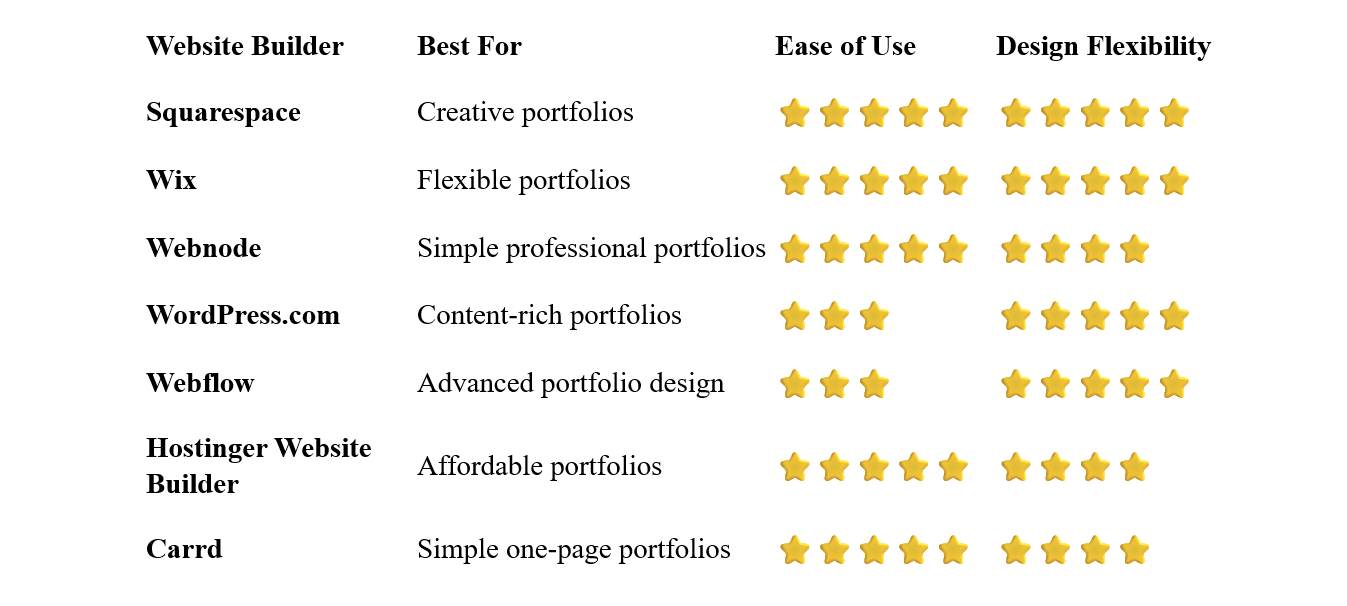
Squarespace – Best Overall for Creative Portfolios
Squarespace is one of the strongest choices for portfolio websites, particularly for creative professionals.
Its templates put visual presentation at the center of the experience. Large images, clean typography, galleries, and carefully structured layouts can make your work the focus of the website.
Squarespace is particularly popular among photographers, designers, artists, architects, and other creative professionals.
You can create project pages, image galleries, portfolios, blogs, contact pages, and other sections without coding.
Why choose Squarespace?
- Excellent portfolio templates
- Strong visual design
- High-quality image presentation
- Responsive layouts
- Blogging functionality
- Ecommerce support
- No coding required
The main disadvantage is that users looking for extreme customization may eventually find the platform more restrictive than Webflow or other advanced tools.
Best for: Photographers, artists, designers, architects, and creative professionals.
Wix – Best for Flexible Portfolio Websites
Wix is another excellent portfolio builder, especially if you want more control over the layout and design.
Its visual editor allows you to customize many aspects of your website without coding. You can create galleries, project pages, animations, contact forms, blogs, and other sections.
Wix also offers a large selection of portfolio-oriented templates, making it easy to find a starting point that matches your profession.
The amount of customization can be a major advantage, although beginners may find the number of options slightly overwhelming.
Best for: Creatives and freelancers who want extensive control over their portfolio design.
Webnode – Best for Simple Professional Portfolios
Webnode is a good choice if you want to create a professional portfolio without spending a lot of time dealing with website design and technical settings.
Its visual editor makes it easy to create pages, add images, organize content, and modify layouts without coding.
Webnode may not offer the same level of visual freedom as Squarespace, Wix, or Webflow, but that can actually be an advantage if your priority is getting a clean portfolio online quickly.
You can start with a suitable template and replace the sample content with your own projects, images, biography, and contact information.
Why choose Webnode?
- Very easy to use
- No coding required
- Visual editor
- Professional templates
- Image galleries
- Blogging functionality
- Contact forms
- SEO tools
- Custom domain options
Webnode is particularly attractive for freelancers and professionals who want their portfolio to look professional without becoming a web-design project in itself.
Best for: Freelancers, professionals, beginners, and anyone who values simplicity.
WordPress.com – Best for Content-Rich Portfolios
WordPress.com can be a good choice if your portfolio needs to contain a lot of written content.
For example, a writer might want to combine project examples with a large blog, while a consultant might use articles and case studies to demonstrate expertise.
WordPress offers extensive flexibility and a large ecosystem, but it generally takes longer to learn than simpler website builders.
Best for: Writers, bloggers, consultants, publishers, and content-heavy portfolios.
Webflow – Best for Advanced Portfolio Design
Webflow is aimed at users who want much more control over the design and behavior of their portfolio website.
It provides advanced tools for layouts, responsive design, animations, interactions, and CMS content.
You can create highly customized portfolio experiences without traditional coding, although Webflow has a significantly steeper learning curve than beginner-focused platforms.
Best for: Professional designers, digital agencies, and experienced creatives.
Hostinger Website Builder – Best Affordable Portfolio Builder
Hostinger combines website hosting, templates, visual editing, and AI tools.
It can be a practical choice for freelancers, students, and beginners who want to create a portfolio while keeping their initial costs relatively low.
The platform doesn't offer the same design depth as Webflow, but it can provide everything needed for a straightforward portfolio website.
Best for: Beginners, freelancers, students, and budget-conscious users.
Carrd – Best for Simple One-Page Portfolios
Carrd specializes in one-page websites.
That makes it particularly useful if you only need a simple portfolio containing a short introduction, selected projects, links, and contact information.
A one-page portfolio can work very well for freelancers and professionals who want a simple online presence rather than a large website.
Best for: Simple portfolios, freelancers, personal profiles, and one-page websites.
Which Portfolio Builder Is Best for You?
The right choice depends heavily on your profession and the type of work you want to display.
Best for Photographers
Photography portfolios need excellent image presentation, galleries, and responsive layouts.
Squarespace and Wix are particularly strong choices.
Best for Designers
Designers often want more control over the presentation of individual projects.
Wix, Squarespace, and Webflow are worth considering depending on how much customization you need.
Best for Writers
Writers need good typography, project pages, and often a blog.
WordPress.com can be an excellent choice, while Webnode is a simpler alternative.
Best for Freelancers
Freelancers usually need a combination of portfolio projects, an introduction, services, testimonials, and contact information.
Webnode and Wix are both strong options.
Best for Artists
Artists need a visually focused website where the work takes center stage.
Squarespace is particularly well suited to this purpose, while Wix offers more freedom for custom layouts.
Best for a Simple Portfolio
If you don't want to spend much time building your website, Webnode can be a very practical choice.
If you only need a single page, Carrd may be enough.
What Should a Portfolio Website Include?
A good portfolio doesn't need dozens of pages.
The following structure works well for many professionals.
Homepage
Introduce yourself and immediately show visitors what you do.
Your strongest projects should be easy to find.
About
Explain who you are, what you specialize in, and what makes your work different.
You can also include relevant experience, education, or professional background.
Portfolio or Projects
This is the most important section.
Choose your strongest work rather than uploading everything you've ever created.
Each project can include:
- Project title
- Images
- Short description
- Your role
- Tools or techniques used
- Results or outcomes
- Link to the finished work, when appropriate
Services
If you're looking for clients, explain what you offer.
Keep the information clear and avoid unnecessary detail.
Testimonials
Positive feedback from previous clients can help establish credibility.
Contact
Make it easy for potential clients or employers to contact you.
A simple contact form and professional email address are usually enough.
Blog or Articles
A blog isn't necessary for every portfolio, but it can demonstrate expertise and give search engines more content to discover.
How Many Projects Should You Put in a Portfolio?
More isn't necessarily better.
A portfolio containing 50 average projects can be less effective than one featuring 8–12 excellent examples.
Choose work that demonstrates your strongest skills and represents the type of projects you want to attract in the future.
If you specialize in several areas, organize projects into categories so visitors can find relevant work easily.
Should You Use a Free Portfolio Website?
You can.
Several website builders offer free plans that allow you to create basic portfolio websites.
A free plan can be useful when you're:
- A student
- Testing your portfolio
- Building your first website
- Working on a personal project
- Not ready to purchase a domain
However, a professional portfolio usually benefits from a custom domain.
For example:
janedoe.com
looks considerably more professional than a platform-specific subdomain.
If your portfolio is intended to help you find clients or employment, investing in a custom domain is usually worthwhile.
Do Portfolio Websites Need to Be Complicated?
No.
One of the biggest mistakes people make is trying to create a portfolio that is more impressive than their actual work.
The website should showcase your projects, not compete with them.
A simple layout with excellent images, clear typography, easy navigation, and concise descriptions can be much more effective than a complicated design filled with animations.
This is one reason simple website builders can work particularly well for portfolios.
How to Build a Portfolio Website
1. Choose Your Best Work
Before creating the website, select the projects you want to showcase.
Select a platform based on the type of work you're presenting and how much design control you need.
3. Choose a Portfolio Template
Starting with a portfolio template can save considerable time.
4. Create Your Main Pages
Start with Home, About, Portfolio, and Contact.
Add Services, Testimonials, Blog, or other pages if necessary.
5. Upload Your Projects
Use high-quality images and provide enough information to explain each project.
6. Connect Your Domain
Choose a professional domain that is easy to remember.
For many freelancers and creatives, using your own name is a sensible option.
Check every important project on a smartphone.
Large images should remain attractive without making the pages unnecessarily slow.
8. Publish and Update
Publish your portfolio and keep it current.
Replace older work when you have stronger projects to showcase.
Common Portfolio Website Mistakes
Showing Everything
A portfolio should be curated.
Only include work that supports the professional image you want to create.
Poor Image Quality
If your work is visual, low-quality images can undermine the entire website.
Use appropriately sized, high-quality images.
Too Much Text
Visitors usually want to see your work first.
Keep project descriptions informative but concise.
Complicated Navigation
Make it easy to move between projects and important pages.
Slow Loading Pages
Large images can make portfolio websites particularly slow.
Optimize images before uploading them when necessary.
Forgetting Mobile Users
Many people will discover your portfolio on a smartphone.
Make sure galleries, navigation, buttons, and text work properly on smaller screens.
Not Providing a Clear Contact Option
If you're looking for clients or opportunities, don't make people search for a way to contact you.
Do You Need Coding Skills to Build a Portfolio?
No.
Website builders such as Webnode, Wix, and Squarespace allow you to create professional portfolios without writing code.
You can use templates, visual editors, galleries, and ready-made sections instead.
Coding becomes useful only if you want highly specialized functionality or complete control over the underlying website.
For most portfolio websites, it isn't necessary.
Which Website Builder Is Best for Portfolios?
There is no single winner for every type of portfolio.
Choose Squarespace if visual presentation and professionally designed templates are your highest priorities.
Choose Wix if you want extensive control over your portfolio's layout and design.
Choose Webnode if you want a professional portfolio that is easy and quick to create without technical complexity.
Choose WordPress.com if written content and blogging are central to your portfolio.
Choose Webflow if you're an experienced designer looking for advanced control.
Choose Hostinger Website Builder if affordability is particularly important.
And choose Carrd if a simple one-page portfolio is all you need.
Final Thoughts
Your portfolio website doesn't need to be complicated to be effective.
The most important thing is the quality of your work and how clearly you present it. Choose a website builder that allows your projects to take center stage while making the site easy for visitors to navigate.
For beginners and freelancers who want a straightforward solution, Webnode is a strong choice. It provides the essential tools for creating a professional portfolio without requiring coding or advanced web-design skills.
If design flexibility is your highest priority, Wix or Squarespace may be a better fit. If you need advanced customization, Webflow is worth considering.
Start with your best work, keep the design clean, and make it easy for visitors to understand what you do and how they can contact you.
⭐ Popular Guides ⭐
Ready to start building your website? Explore our popular guides to compare website builders and find the right solution for your needs, experience, and budget.


