

Best Website Builders for Personal Websites 2026
You don't need to be a business owner to have your own website. A personal website can be a simple place to introduce yourself, showcase your work, share your interests, publish articles, or give people a professional way to find and contact you.
The good news is that creating a personal website is easier than ever. Modern website builders allow you to choose a template, add your own content and images, and publish a professional-looking website without coding.
But personal websites can serve very different purposes. A freelancer may need a portfolio and contact form, while someone building a personal blog may care more about publishing tools. A student may simply want an online profile, while a creative professional may want a visually impressive portfolio.
In this guide, we'll look at the best website builders for personal websites in 2026 and help you choose the right one for your needs.
What Is a Personal Website?
A personal website is a website created primarily to represent an individual rather than a company or organization.
It can be as simple or sophisticated as you want.
A personal website can include:
- A personal introduction
- Biography or About page
- Portfolio
- Resume or CV
- Blog
- Photography
- Projects
- Services
- Contact information
- Links to social media profiles
You don't need to be famous or have a large online following to benefit from having your own website.
For many people, a personal website is simply a place they control on the internet.
Best Website Builders for Personal Websites
Different platforms are better suited to different types of personal websites.
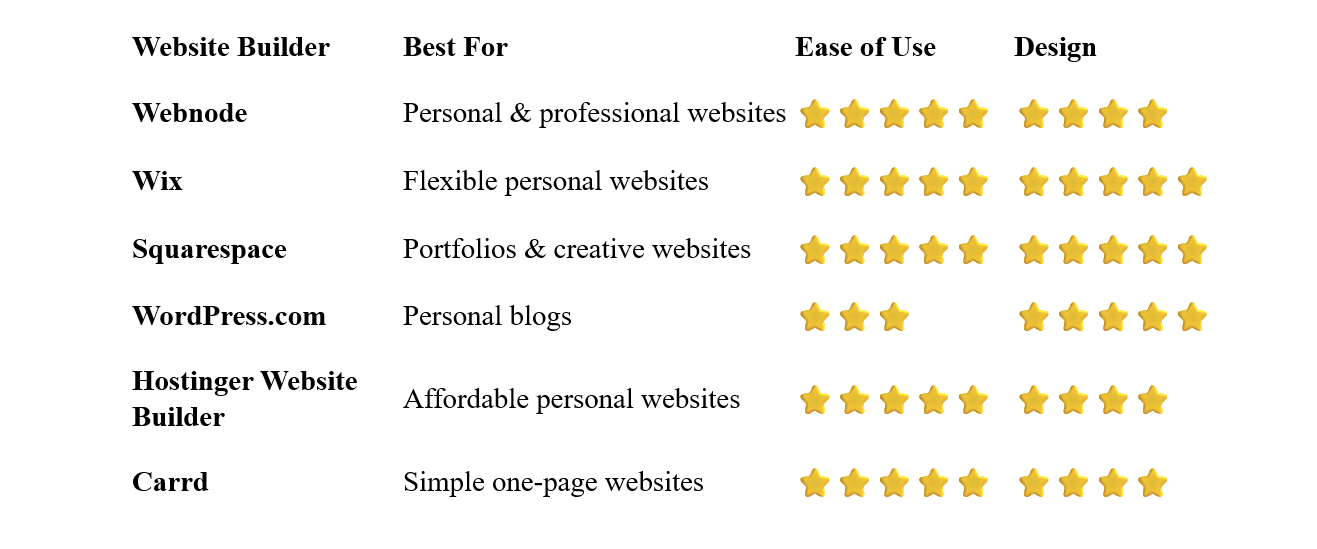
Webnode – Best Overall for Personal Websites
Webnode is a strong choice if you want to create a personal website without dealing with complicated technical setup.
Its visual editor allows you to create pages, add images, write content, and customize the design without coding. You can start from a template or use AI-powered tools to help create the initial website.
Webnode is flexible enough for a simple personal homepage but also provides features you may need if your website grows into a portfolio, blog, or professional site.
You can include pages such as:
- Home
- About Me
- Portfolio
- Blog
- Services
- Contact
Hosting is included, and you can connect a custom domain with an appropriate paid plan.
Why choose Webnode?
- Beginner-friendly editor
- No coding required
- Personal website templates
- AI website-building tools
- Hosting included
- Blogging functionality
- Forms
- SEO tools
- Custom domain options
Best for: Personal websites, freelancers, professionals, portfolios, and people who want an easy website-building experience.
Wix – Best for Flexible Personal Websites
Wix is another excellent choice if you want more freedom over the appearance of your personal website.
Its visual editor gives you considerable control over page layouts, images, fonts, buttons, galleries, and other elements.
Wix also offers a large selection of templates designed for portfolios, personal websites, resumes, photography, blogs, and other individual projects.
If you enjoy experimenting with design and want more control over the visual appearance of your website, Wix is worth considering.
Best for: People who want extensive design flexibility and a large selection of templates.
Squarespace – Best for Creative Personal Websites
Squarespace is particularly well suited to personal websites where visual presentation matters.
Its professionally designed templates work especially well for photographers, designers, artists, writers, architects, consultants, and other creative professionals.
You can create a portfolio, blog, personal profile, or professional website without knowing how to code.
The main attraction is the quality and consistency of the designs. You don't have to be an experienced designer to start with a visually polished layout.
Best for: Creatives, photographers, artists, designers, and portfolio websites.
WordPress.com – Best for Personal Blogs
WordPress.com is a particularly good option if publishing articles is an important part of your personal website.
You can create a blog, write articles, add images and other media, and gradually build a large content library.
WordPress offers a huge ecosystem and significant flexibility, although it can take more time to learn than simpler website builders.
If you expect your personal website to become primarily a blog or content platform, the additional flexibility can be useful.
Best for: Bloggers, writers, journalists, and content creators.
Hostinger Website Builder – Best Affordable Option
Hostinger provides an affordable way to create a personal website using a visual editor.
Its templates and AI tools can help beginners create a website without starting from scratch.
Hostinger can be suitable if you want a basic personal website, portfolio, or online profile while keeping your initial costs relatively low.
Best for: Beginners, personal projects, freelancers, and budget-conscious users.
Carrd – Best for Simple One-Page Websites
Carrd is designed specifically for simple, responsive one-page websites.
That makes it a great option if you don't need a traditional multi-page website.
You could use Carrd to create a personal profile containing:
- Your name
- Short biography
- Profile photo
- Links
- Social media accounts
- Portfolio items
- Contact information
Its simplicity is its main advantage. If you only need one attractive page, there's little reason to use a much more complicated platform.
Best for: Personal profiles, simple portfolios, landing pages, and online business cards.
Which Personal Website Builder Is Best for You?
The best platform depends on what you want your personal website to accomplish.
Best for a Simple Personal Website
If you want a few pages introducing yourself and your interests, Webnode or Wix are strong choices.
Best for a Professional Profile
If the website is intended to support your career, freelancing, or professional reputation, look for a platform that supports portfolios, contact forms, custom domains, and professional design.
Webnode, Wix, and Squarespace all work well for this type of website.
Best for a Portfolio
If images and visual presentation are central to your website, Squarespace or Wix are particularly attractive.
Best for a Personal Blog
If publishing articles will be the main purpose of your website, WordPress.com is worth considering.
Best for a One-Page Personal Profile
If you only want one page with your biography, links, and contact information, Carrd can be a simple solution.
Best for a Budget-Friendly Website
If keeping costs low is important, Hostinger Website Builder is worth considering. You can also explore free plans from several website builders before deciding whether you need a paid website.
What Should a Personal Website Include?
You don't need dozens of pages to create a useful personal website.
Start with the information visitors are most likely to need.
Home
Your homepage should immediately tell visitors who you are and what your website is about.
A short introduction and a clear visual identity are often enough.
About Me
This is where you can provide more information about your background, interests, experience, or goals.
Keep it relevant to the people you expect to visit your website.
Portfolio or Projects
If you work in a creative or professional field, show examples of your work.
This could include photographs, designs, writing, projects, case studies, or other accomplishments.
Resume or CV
A personal website can be a useful place to present your professional experience.
You can either create a dedicated page or provide a downloadable resume.
Blog
A blog is optional, but it can be a useful way to share your ideas and demonstrate expertise.
It can also give visitors a reason to return to your website.
Contact
Give visitors an easy way to get in touch.
Depending on your goals, this could be a contact form, email address, or links to professional social networks.
Do You Need a Custom Domain for a Personal Website?
Not necessarily.
If you're experimenting with a personal website, a free platform subdomain can be perfectly acceptable.
However, a custom domain usually makes a personal website look more professional.
For example:
johnsmith.com
is easier to remember and share than a long platform-generated address.
A custom domain is especially useful if your website represents your professional identity or portfolio.
Can You Create a Personal Website for Free?
Yes.
Several website builders offer free plans that allow you to create a basic personal website.
Free plans are useful for:
- Testing an idea
- Learning how a website builder works
- Creating a hobby website
- Building a basic personal profile
- Experimenting with different designs
The main limitations are usually a platform subdomain, restricted storage, platform branding, and fewer advanced features.
If your personal website becomes important to you, upgrading to a paid plan and connecting a custom domain is usually straightforward.
Personal Website vs. Social Media Profile
Social media profiles can be useful, but they don't replace having your own website.
A social media profile exists on someone else's platform. Your website gives you much more control over how you present yourself and what information visitors see.
A personal website can also bring everything together in one place.
For example, your homepage could include links to:
- YouTube
- GitHub
- X
- Other relevant profiles
Your website can therefore act as a central hub for your online presence.
How to Create Your Personal Website
You don't need to complete everything in one day.
1. Decide What You Want to Achieve
Think about why you want a website.
Do you want to showcase your work, share your interests, publish articles, find freelance clients, or simply have your own place online?
Select a platform based on your goals and technical experience.
For most beginners, simplicity is more important than having hundreds of advanced features.
Find a design that fits your personality or professional identity.
You don't need to build everything from scratch.
Start with your homepage, About page, and Contact page.
Add a portfolio, blog, resume, or other sections if they are relevant to your goals.
Use your own photographs, writing, projects, and information.
Your personal website should feel personal rather than like a generic template.
6. Choose a Domain
If you're creating a professional website, consider registering a domain based on your name, profession, or personal brand.
Make sure your website works well on smartphones.
This is especially important for portfolios and image-heavy websites.
8. Publish and Keep Improving
Your first version doesn't have to be perfect.
Publish the essential information and improve the website as you learn more about what your visitors need.
Common Personal Website Mistakes
Trying to Say Too Much
Your website doesn't need to contain your entire life story.
Focus on information that is useful or interesting to your visitors.
Using Poor-Quality Images
If your website is a portfolio or creative profile, image quality matters.
Use clear, appropriately sized images and avoid filling every page with unnecessary graphics.
Making Navigation Complicated
Keep the main navigation simple.
Visitors should be able to find important information quickly.
Forgetting Mobile Visitors
Always check how your website looks on a phone.
Not Updating the Website
An outdated personal website can give visitors the impression that you no longer maintain it.
Update your portfolio, biography, projects, and contact information when necessary.
Using an Unprofessional Email Address
If your website is used for professional purposes, consider using an email address connected to your own domain rather than an old or informal address.
Do You Need Coding Skills?
No.
A modern website builder can handle the technical side of creating a personal website for you.
You can build pages, add images, change fonts and colors, create navigation, and publish your website through a visual interface.
Learning some HTML or CSS can be useful if you eventually want more control, but it isn't necessary for creating a professional personal website.
Which Website Builder Is Best for Personal Websites?
There isn't one perfect platform for everyone.
Webnode is an excellent choice if you want an easy way to create a personal or professional website without technical complexity.
Wix is a good option if you want more freedom over the design.
Squarespace is particularly attractive for creative portfolios and visually focused websites.
WordPress.com makes sense if your personal website will primarily be a blog.
Hostinger Website Builder is worth considering if affordability is important.
And Carrd is ideal when one simple page is all you need.
Final Thoughts
A personal website can be as simple as a single page or as comprehensive as a complete online portfolio and blog.
The best platform is therefore the one that matches what you actually want to accomplish.
For most people creating their first personal website, Webnode is a particularly strong choice because it combines an easy visual editor with templates and the features needed to build and manage a professional website without coding.
Start small, focus on useful content, choose a design that represents you, and expand your website when you have a reason to do so. Your personal website doesn't need to be complicated to be valuable.
⭐ Popular Guides ⭐
Ready to start building your website? Explore our popular guides to compare website builders and find the right solution for your needs, experience, and budget.


